Posts with «arduino» label

Arduino motor control problems!


Update 06/11/2016

Hey guys,

I sort of got the motor working. Adding a small resistance(about 2-3ohms) in series with the motor seemed to stop the Atmega reseting whenever Pin 3 was pulled HIGH (still don't know for sure what was causing this!). I'll still continue t troubleshoot this problem and completely figure out what exaclty was causing the Atmega to reset, since the resistor is not a permanent solution (wasteful energy loss). I'm really grateful for the huge amount of help from here guys!! Thanks alot! :)

Cheers!

read more

Let's Make Robots 26 Oct 12:06
arduino  avr  motor  noise  power supply  

Arduino motor control problems!

Hey guys,

I'm having trouble regarding motor control in a project I'm working on.

It uses an ATMega328 DIP package on a PCB. The motors I'm using are small coreless motors and I'm trying to control them using Si2302ds N-MOS FETs. For the power supply I'm using a 3.7V(4.2V on full charge) Lipo. I've tested this setup on a promini before and the motors turned on and off just fine.

read more

Let's Make Robots 26 Oct 12:06
arduino  avr  motor  noise  power supply  

Arduino motor control problems!


Update 06/11/2016

Hey guys,

I sort of got the motor working. Adding a small resistance(about 2-3ohms) in series with the motor seemed to stop the Atmega reseting whenever Pin 3 was pulled HIGH (still don't know for sure what was causing this!). I'll still continue t troubleshoot this problem and completely figure out what exaclty was causing the Atmega to reset, since the resistor is not a permanent solution (wasteful energy loss). I'm really grateful for the huge amount of help from here guys!! Thanks alot! :)

Cheers!

read more

Let's Make Robots 26 Oct 12:06
arduino  avr  motor  noise  power supply  

Dual-boot Your Arduino

There was a time, not so long ago, when all the cool kids were dual-booting their computers: one side running Linux for hacking and another running Windows for gaming. We know, we were there. But why the heck would you ever want to dual-boot an Arduino? We’re still scratching our heads about the application, but we know a cool hack when we see one; [Vinod] soldered the tiny surface-mount EEPROM on top of the already small AVR chip! (Check the video below.)
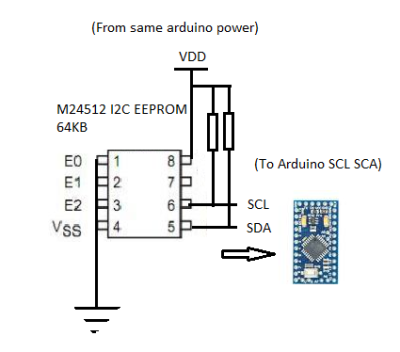
Aside from tiny-soldering skills, [Vinod] wrote his own custom bootloader for the AVR-based Arduino. With just enough memory to back up the AVR’s flash, the bootloader can shuffle the existing program out to the EEPROM while flashing the new program in. For more details, read the source.

While you might think that writing a bootloader is deep juju (it can be), [Vinod]’s simple bootloader application is written in C, using a style that should be familiar to anyone who has done work with an Arduino. It could certainly be optimized for size, but probably not for readability (and tweakability).

Why would you ever want to dual boot an Arduino? Maybe to be able to run testing and stable code on the same device? You could do the same thing over WiFi with an ESP8266. But maybe you don’t have WiFi available? Whatever, we like the hack and ‘because you can’ is a good enough excuse for us. If you do have a use in mind, post up in the comments!


Filed under: Arduino Hacks, Microcontrollers

A custom-made interactive condo for your entertainment

For those living in a high-rise, have you ever wondered what was going on behind the closed blinds of your neighbor’s home directly across from you?

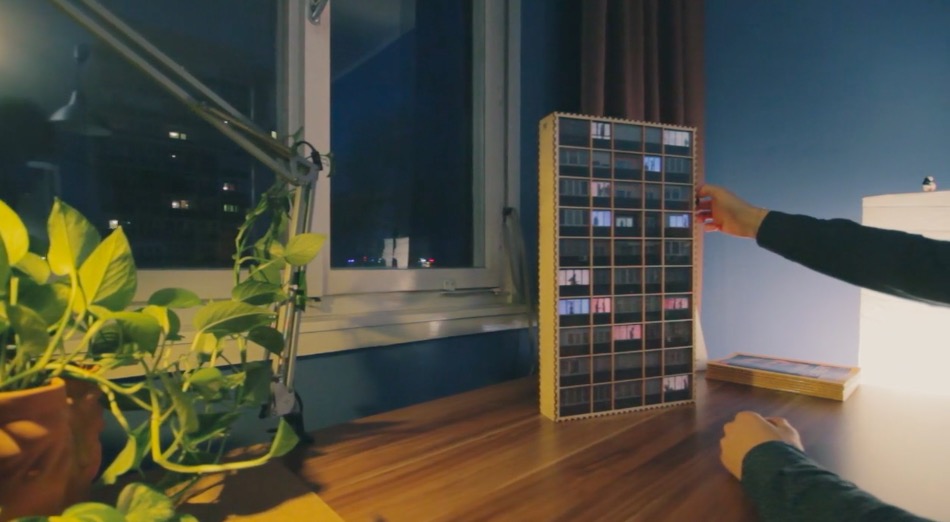
Caretaker is a concept project that explores just that. It consists of a custom-made switch board with which you can control the lights of the flats opposite of yours, providing active entertainment that stimulates your senses better than passive media consumption.

If you want one of your own, simply take a picture of the building that you see from your window and Caretaker will design a laser-cut scale model of it for your use. The prototype runs on an Arduino and is battery-powered, allowing you to freely move it around.

The project is the work of Moholy-Nagy University of Art and Design Budapest (MOME) student, Máté Varga, in collaboration with Barbara Sterk, Miklos Erhardt, Adam Polhodzik, and FabLab Budapest.

You can see it in action below!

A custom-made interactive condo for your entertainment

For those living in a high-rise, have you ever wondered what was going on behind the closed blinds of your neighbor’s home directly across from you?

Caretaker is a concept project that explores just that. It consists of a custom-made switch board with which you can control the lights of the flats opposite of yours, providing active entertainment that stimulates your senses better than passive media consumption.

If you want one of your own, simply take a picture of the building that you see from your window and Caretaker will design a laser-cut scale model of it for your use. The prototype runs on an Arduino and is battery-powered, allowing you to freely move it around.

The project is the work of Moholy-Nagy University of Art and Design Budapest (MOME) student, Máté Varga, in collaboration with Barbara Sterk, Miklos Erhardt, Adam Polhodzik, and FabLab Budapest.

You can see it in action below!

Minecraft Sword Lights Up When Nearby Friends

With All Hallow’s Eve looming close, makers have the potential to create some amazing costumes we’ll remember for the rest of the year. If you’re a fan of the hugely addict-*cough* popular game Minecraft, perhaps you’ve considered cosplaying as your favorite character skin, but lacked the appropriate props. [Graham Kitteridge] and his friends have decided to pay homage to the game by making their own light-up Minecraft swords.

These swords use 3D-printed and laser-cut parts, designed so as to hide the electronics for the lights and range finder in the hilt. Range finder? Oh, yes, the sword uses an Arduino Uno-based board to support NewPixels LEDs and a 433Mhz radio transmitter and receiver for ranged detection of other nearby swords that — when they are detected — will trigger the sword to glow. Kind of like the sword Sting, but for friendlies.

All of the files for the parts are available on the project’s Thingverse page and the board setup can be purchased here. If you want to have some fun controlling the real world from inside Minecraft, check out how this fan uses it to turn on lamps in their home.


Filed under: 3d Printer hacks, Arduino Hacks, weapons hacks

The GoonieBox challenges guests to solve its riddles

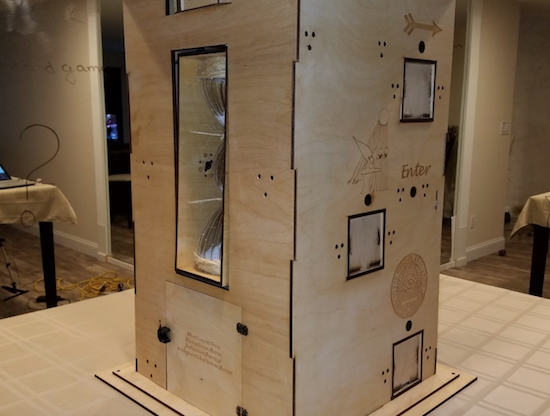
Inspired by The Goonies movie and The Room game, Guido Bonelli has constructed a piece of Arduino-controlled interactive furniture to entertain his guests.

After what appears to be a massive amount of work involving 3D printing, laser cutting, wiring, and programming, Bonelli has come up with a puzzle box that shouldn’t need any explanation. Using button presses and other interactions with it, participants are able to unlock a treasure box in the bottom, a working wooden safe!

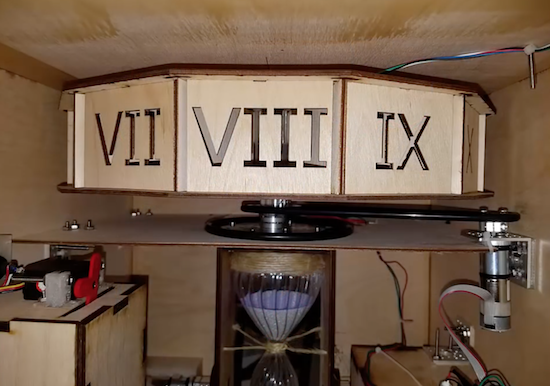
Additionally, the box tells time in a very unique way. It has an hourglass that is automatically flipped to indicate minutes, and Roman numerals at the top to reveal hours. You can see how it works and how it was assembled in the videos below!

I wanted to create a unique piece of furniture for my home which my guests could interact with. This time however, I wanted it to be something which I wouldn’t have to explain how it worked. Instead, I wanted mysterious scriptures scribed all over the sculpture to intrigue my guests.

At the heart of GoonieBox is of course an Arduino… Effortlessly whisking away my artistically written 0’s and 1’s into a symphony of movement, sound and game play. Taking approximately 800 hours of build time, GoonieBox is my greatest accomplishment by far in the world of Arduino.

You can find more information on the project’s Hackster.io posting, or check out the author’s interesting Dr.Duino product page.

The GoonieBox challenges guests to solve its riddles

Inspired by The Goonies movie and The Room game, Guido Bonelli has constructed a piece of Arduino-controlled interactive furniture to entertain his guests.

After what appears to be a massive amount of work involving 3D printing, laser cutting, wiring, and programming, Bonelli has come up with a puzzle box that shouldn’t need any explanation. Using button presses and other interactions with it, participants are able to unlock a treasure box in the bottom, a working wooden safe!

Additionally, the box tells time in a very unique way. It has an hourglass that is automatically flipped to indicate minutes, and Roman numerals at the top to reveal hours. You can see how it works and how it was assembled in the videos below!

I wanted to create a unique piece of furniture for my home which my guests could interact with. This time however, I wanted it to be something which I wouldn’t have to explain how it worked. Instead, I wanted mysterious scriptures scribed all over the sculpture to intrigue my guests.

At the heart of GoonieBox is of course an Arduino… Effortlessly whisking away my artistically written 0’s and 1’s into a symphony of movement, sound and game play. Taking approximately 800 hours of build time, GoonieBox is my greatest accomplishment by far in the world of Arduino.

You can find more information on the project’s Hackster.io posting, or check out the author’s interesting Dr.Duino product page.

Cutting cable with scissors and Arduino

2PrintBeta solves the problem of cutting multiple cables with an innovative scissors setup.

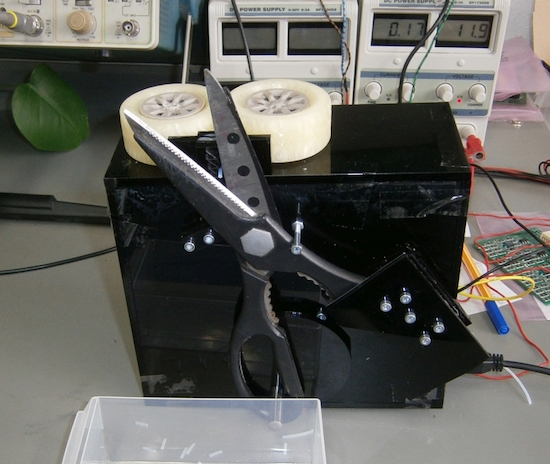
At times, the 3D printing and engineering company 2PrintBeta needs to cut wires and other assorted materials to length. Sure, they could simply cut them by hand, but that takes time and their business is growing. An industrial cable cutter is quite expensive, so being an engineering company, they decided to make their own using a rather rugged pair of scissors actuated by a bolt attached to a drive disk.

For this operation, wire feeding is done by a pair of 3D-printed wheels, and the “brains of the operation” is provided by an Arduino Mega using stepper motor drivers.

The ideas ranged from razorblades to a holder for a dremel with a cut sheet. But a short test showed: scissors are sufficient. So why not use scissors?

If you’re skeptical about how well scissors work in this application, be sure to check out their video below! You can also read more about the project here, or check out Hackaday’s writeup.