Posts with «arduino» label

A four-factor lockbox
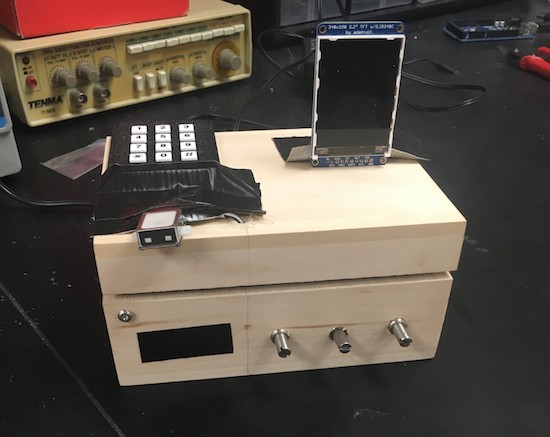
If you really don’t want someone messing with your valuables, a programmable box may be just what you need!

Locking mechanisms generally work using one method—a key, for example—to keep them secure, or perhaps two in certain circumstances. This box, designed as a final project for an electrical and computer engineering class at Cornell, instead makes the user go through four steps to get to the “treasures” inside.
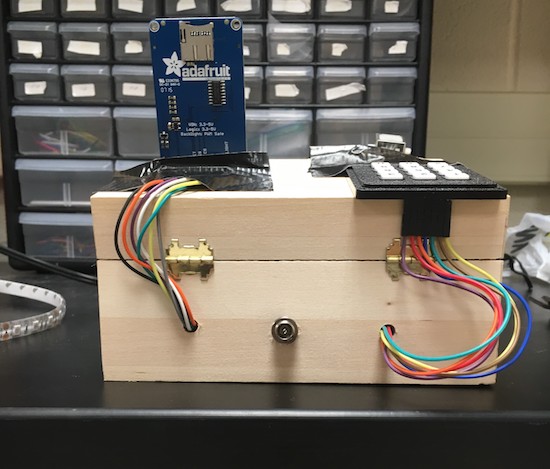
Once the user has input the correct code, set potentiometers to the correct position, knocked on the box in the correct sequence, and finally scanned his or her fingerprint, a solenoid unlatches the box’s. It seems like a great project for an ECE class. On the other hand, the unit is wooden, so if you did forget the authentication procedure, it wouldn’t be too hard to manufacture a literal back door!

A cool idea nevertheless, and certainly something that could help protect your snacks or other items from a sneaky roommate. You can see more about this lockbox on the Cornell-hosted project page.

Dad builds an Arduino Hot Wheels drag strip for son

If you want to eliminate arguments about which toy car is fastest, we’ve got just the project for you.

When one’s kid has a birthday, most people go to the store and buy a gift. Phil Tucker instead decided to build something unique for his two-year-old, an automated Hot Wheels drag strip with an electronic start gate and timer. Like many other gravity race setups, when released, the cars roll to the bottom of a slope.

Tucker’s design, however, releases the cars automatically using a servo and hinge at the press of a button. It then detects the winner using infrared LEDs and light dependent resistors, displaying the results on a miniature marquee. The entire system is controlled by an Arduino Uno.

You can find more on this DIY drag strip here, and see it in action below!

A Beacon Suitable for Tracking Santa’s sleigh?

High-altitude ballooning is becoming a popular activity for many universities, schools and hacker spaces. The balloons, which can climb up to 40 km in the stratosphere, usually have recovery parachutes to help get the payload, with its precious data, back to solid ground safely. But when you live in areas where the balloon is likely to be flying over the sea most of the time, recovery of the payload becomes tricky business. [Paul Clark] and his team from Durham University’s Centre for Advanced Instrumentation are working on building a small, autonomous glider – essentially a flying hard drive – to navigate from 30 km up in the stratosphere to a drop zone somewhere near a major road. An important element of such a system is the locator beacon to help find it. They have now shared their design for an “Iridium 9603 Beacon” — a small Arduino-compatible unit which can transmit its location and other data from anywhere via the Iridium satellite network.

The beacon uses the Short Burst Data service which sends email to a designated mail box with its date, time, location, altitude, speed, heading, temperature, pressure and battery voltage. To do all of this, it incorporates a SAMD21G18 M0 processor; FGPMMOPA6H GPS module; MPL3115A2 altitude sensor; Iridium 9603 Short Burst Data module + antenna and an LTC3225 supercapacitor charger. Including the batteries and antenna, the whole thing weighs in at 72.6 g, making it perfectly suited for high altitude ballooning. The whole package is powered by three ‘AAA’ Energizer Ultimate Lithium batteries which ought to be able to withstand the -56° C encountered during the flight. The supercapacitors are required to provide the high current needed when the beacon transmits data.

The team have tested individual components up to 35 km on a balloon flight from NASA’s Columbia Scientific Balloon Facility and the first production unit will be flown on a much smaller balloon, launched from the UK around Christmas. The GitHub repository contains detailed information about the project along with the EagleCAD hardware files and the Arduino code. Now, if only Santa carried this on his Sleigh, it would be easy for NORAD to track his progress in real time.


Filed under: gps hacks, hardware

Track planets with a laser!

If you’d like to observe certain celestial elements, you could do research and search the sky manually. Or just create a system to do it for you!

This is exactly what Subham Paul has done using an Arduino Mega, a GPS module, and 3.5-turn-pan and 180-degree-tilt servos. The real-time tracking device can predict the position of planets, calculated using Kepler’s Laws.

Data about the celestial body is input into his setup and then precisely pointed it out in the sky with a laser. All of this, of course, is dependent on where the user currently resides, which is taken care of via the GPS module as well as an optional MPU-9250.

As you could imagine, this is naturally an involved project in concept and implementation. You can find an introduction and links to further build steps here.


12 dazzling holiday light displays with Arduino

There’s nothing like a dazzling display of lights to help get you into the holiday spirit. Every year, enthusiasts share the magic of the season by decorating their homes with artfully strung, animated bulbs, while some Makers take their projects to the next level using open-source hardware.

2016 did not disappoint. A quick Google search revealed a bunch of Arduino-controlled LED shows that you’ll want to see!

Did you deck out your house? Share it below! Also, don’t forget to enter your Internet of Holiday Things projects in our latest contest here.

The NRF24L01 Wireless Motor Speed Control System with Arduino

Let's Make Robots 19 Dec 07:26
arduino  avr  nrf24l01  

The NRF24L01 Wireless Motor Speed Control System with Arduino

Let's Make Robots 19 Dec 07:26
arduino  avr  nrf24l01  

The NRF24L01 Wireless Motor Speed Control System with Arduino

Let's Make Robots 19 Dec 07:26
arduino  avr  nrf24l01  

The NRF24L01 Wireless Motor Speed Control System with Arduino

Let's Make Robots 19 Dec 07:26
arduino  avr  nrf24l01  

Speed-Test Your Toys with Die-Cast Drag Strip

I’m sure many of us remember building toy car race tracks as kids, racing the cars, and then arguing over which car came in first and who cheated because they let go of their car too soon. Ah, good times. [Phil] wanted to create a drag strip race track for his son to introduce him to die-cast cars. The only commercial drag strip [Phil] could find didn’t have an electronic start gate or a timer, so he created his own with the help of an Arduino, a servo, and some light dependent resistors.

The Arduino controls everything, the button input, the light sensor input, and the servo. A button press tells the Arduino to start the race by pulling the start gate down and starting the timer. When the light sensor is covered, the timer for that lane stops. The time is shown for each lane using a different colored 4-digit 7-segment LED.

There were a couple of problems that had to be solved. The servo launching the cars was pulling too much power when activated so that the IR LEDs used at the finish line would dim enough to trigger before the race had even begun! [Phil]’s article goes over these issues and his design ideas as he built the track.

It’s a simple build that should provide hours of fun for [Phil]’s son and his friends over the years and will hopefully put to rest any arguments over who won. There are lots of photos in [Phil]’s article, as well as several videos showing off how things work and at the end of the article, he includes the code he used to control everything. This would be a great surprise for any nieces and nephews coming to visit over the holidays — you might want to wait for final assembly and include them in the fun!

If you like these kind of projects, we’ve seen a similar Hot Wheels timing system, and a different kind of race track based on a turntable system.


Filed under: Arduino Hacks, toy hacks