Posts with «arduino» label

X Marks the Clock

There’s no shortage of Arduino-based clocks around. [Mr_fid’s] clock, though, gets a second look because it is very unique looking. Then it gets a third look because it would be very difficult to read for the uninitiated.

The clock uses three Xs made of LEDs. There is one X for the hours (this is a 24-hour clock), another for the minutes, and one for the seconds. The left side of each X represents the tens’ digit of the number, while the right-side is the units.

But wait… even with two segments on each side of the X, that only allows for numbers from 0 to 3 in binary, right? [Mr_fid] uses another dimension–color–to get around that limitation. Although he calls this a binary clock, it is more accurately a binary-coded-decimal (BCD) clock. Red LEDs represent the numbers one to three. Green LEDs are four to six. Two blue segments represent seven to nine. It sounds complicated, but if you watch the video, below, it will make sense.

This isn’t [Mr_fid’s] first clock. He is using a DS1307 real time clock module to make up for the Arduino’s tendency to drift. Even if you aren’t interested in the clock, the mounting of the LEDs with plastic–and the issues he had isolating them from each other–might come in handy in other displays.

We’ve seen a lot of Arduino clocks over the years, including some that talk. We’ve even seen some that qualify as interactive furniture, whatever that is.


Filed under: Arduino Hacks, clock hacks
Hack a Day 13 Jan 03:00

These students created their own Overwatch VR rig

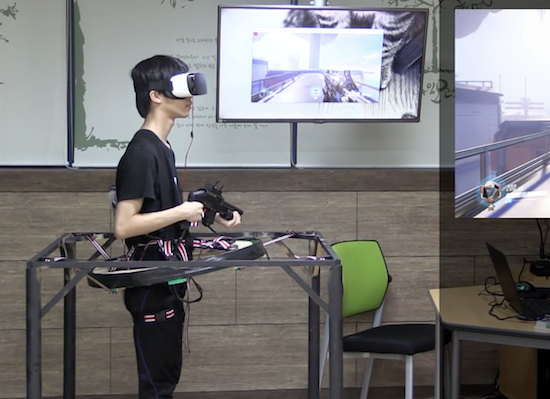
A group of high school students in South Korea have created a multi-part rig that lets them play Overwatch in virtual reality.

Their console, which resembles somewhat of a Virtuix Omni treadmill, enables users to move around the battlefield by leaning in whichever direction they want to go, to fire and reload their weapon with a custom toy gun controller, and even to hit things by punching the air.

As you can see in the video below, the setup consists of a Samsung Gear VR headset, a smartphone, Arduino boards, an IMB sensor, a button, a ball bearing, a PC, a motion detection device, and a copy of Overwatch.

Although there’s a bit of input lag, it’s still an incredible project by a team of young Makers. You can read more on PC Gamer.

CrashSpace BigButton w/ ESP8266

At CrashSpace we have a publicly-viewable “sign” at https://crashspacela.com/sign/ to let members know when the space is open. This sign page is updated by a big button in the front room. Press it, the sign page updates, and you’ve promised to be in the space for an hour. But last month, the button broke. So I [...]
Todbot 12 Jan 18:40

Baby’s First Hands-Free Stroller

So you’ve had your first child. Congratulations; your life will never be the same again. [Dusan] was noticing how the introduction of his children into his life altered it by giving him less time for his hobbies in his home laboratory, and decided to incorporate his children into his hacks. The first one to roll out of his lab is a remote-controlled baby stroller.

After some engineering-style measurements (lots of rounding and estimating), [Dusan] found two motors to drive each of the back wheels on a custom stroller frame. He created a set of wooden gears to transfer power from the specialized motors to the wheels. After some batteries and an Arduino were installed, the stroller was ready to get on the road. At this point, though, [Dusan] had a problem. He had failed to consider the fact that children grow, and the added weight of the child was now too much for his stroller. After some adjustments were made (using a lighter stroller frame), the stroller was eventually able to push his kid around without any problems.

This is an interesting hack that we’re not sure has much utility other than the enjoyment that came from creating it. Although [Dusan]’s kid certainly seems to enjoy cruising around in it within a close distance to its operator. Be sure to check out the video of it in operation below, and don’t forget that babies are a great way to persuade your significant other that you need more tools in your work bench, like a CNC machine for example.


Filed under: wireless hacks

Attachment is like a modern-day message in a bottle

If you want to reach out to someone, you could always pick up your phone and send a text. But if you’re seeking something a bit more random and indirect, one idea would be to write and attach a message to a biodegradable balloon using Swiss designer David Colombini’s “poetic machine.”

Colombini’s Attachment project allows you to do just that, by dispatching digital notes, images or videos gleaned from the Internet into the atmosphere. Once the Arduino Mega-driven device receives this input, the message is laser-etched on a thin piece of balsa wood, then released into the air (though a human has to ‘reload’ after five launches). Word space is limited to a Twitter-esque 120 characters, but the finder of the balloon can access any additional content that you include through a code on the project’s website.

According to Creative Applications:

Software includes PHP / MySQL database, vvvv (take the message from web database, layout of the message, transform it and stream it to the engraver) and Arduino IDE (controlling all the mechanisms). Hardware includes an Arduino Mega, NEMA 23 motors + drivers, linear actuators, a Bambi air compressor, helium cylinder, Festo pneumatic components (helium + air valves, helium and air pressure sensors, pneumatic cylinders, DHEB) and MicroSlice engraver (based on Arduino Uno).

You can read more on this project as well as its previous version. Additionally, visit the Attachment.cc page to input your own message!

(Photos: David Colombini)

Scare away unwanted guests with an eye-moving portrait

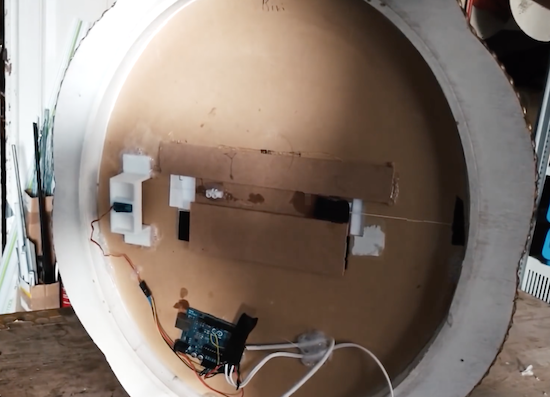
There are certainly many ways to generate an old-looking portrait with moving eyes, but this method from Sonic Robots is simple and seems quite effective. The basic formula is to buy a Victorian-like frame, get a picture of a loved/hated/random person (preferably tweaked to resemble an antique oil painting), then put a strip of paper with eyes printed on it behind the person’s eye sockets.

This eyeball strip is pulled by a servo via a fishing line, and importantly, a rubber band keeps tension on it from the other side. This allows it to quickly snap back into place, creating an effect where the eyes randomly move then stay in place for a while, hopefully causing someone to question his or her sanity.

Since everything is Arduino Uno-based, this could be expanded to include sensors for eye control, or even lighting effects as desired.

You can find more details on the project on SonicRobots.com and its code on GitHub.

Watch an Arduino Mega-based robot play the bagpipes

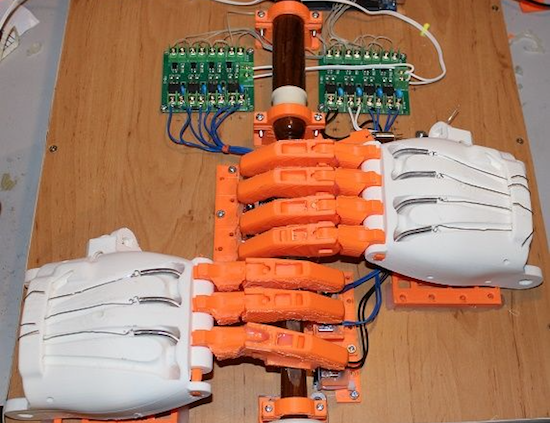
Using gigantic hands scaled up from a prosthetic design, “XenonJohn” can now hear the sweet sounds of Scotland whenever he wants.

Seeing this invention, you might note to yourself that most instrument-playing robots don’t actually bother to have realistic—if huge, at 171% normal print size—hands attached. Then again, you probably haven’t seen a robot configured to play the bagpipes.

The robot named Ardu McDuino plays the bagpipes, or rather the chanter part that is manipulated with one’s fingers, using actual prosthetic fingers to cover the holes. It also has a less-realistic “thumb” to cover a hole on the back.

Everything is controlled using an Arduino Mega via a bank of opto-isolated MOSFETs, along with solenoids to let it grip the individual air holes for music generation. You can read more about this project on its Instructables page!

Ardu McDuino Plays the Bagpipes

To “pipe in” the new year, [John] decided to build a bagpipe-playing robot. Unlike other instrument-playing robots that we’ve seen before, this one is somewhat anatomically correct as well. John went the extra mile and 3D printed fingers and hands to play his set of pipes.

The brains of the robot are handled by an Arduino Mega 2560, which drives a set of solenoids through a driver board. The hands themselves are printed from the open source Enabling the Future project which is an organization that 3D prints prosthetic hands for matched recipients, especially people who can’t otherwise afford prosthetics. He had to scale up his hands by 171% to get them to play the pipes correctly, but from there it was a fairly straightforward matter of providing air to the bag (via a human being) and programming the Arduino to play a few songs.

The bagpipe isn’t a particularly common instrument (at least in parts of the world that aren’t Scottish) so it’s interesting to see a robot built to play one. Of course, your music-playing robot might be able to make music with something that’s not generally considered a musical instrument at all. And if none of these suit your needs, you can always build your own purpose-built semi-robotic instrument as well.


Filed under: musical hacks

Cozy Coupe toy car retrofitted with Arduino

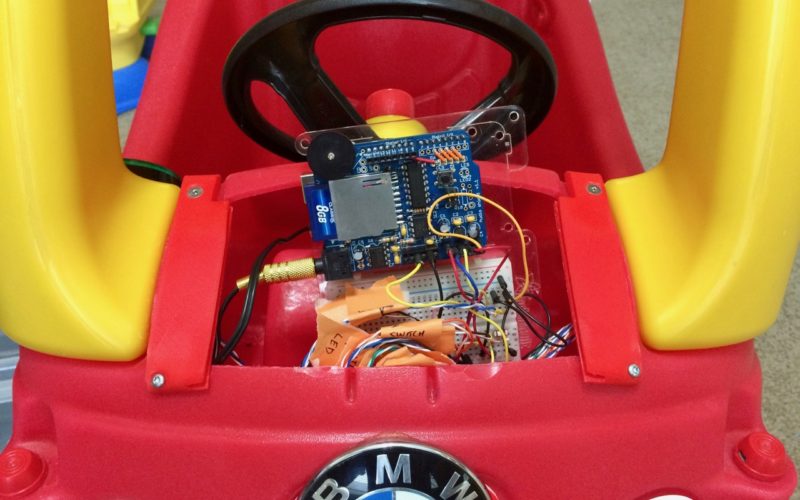
Using an Arduino Uno along with an Adafruit Wave Shield, Brent Chapman added more features to the Little Tikes Cozy Coupe including a push-to-start ignition and a sound system.

Although Chapman notes that the Coupe comes with some onboard entertainment options, he thought “his client” deserved something a bit more high-tech. This meant that he retrofitted the classic toy with several pushbuttons that allow him to select a fun song to play and replaced the key with a giant arcade button. He also 3D-printed a replacement hood for the car to cover the electronics, since the original was modified to fit them inside.

Per the second video on the project’s page, his little client seems to be hesitant at first, but eventually starts happily car-dancing along to Mickey Mouse Clubhouse’s  “Hot Dog Dance” tune that parents will probably be familiar with.

You can see the entire build, including videos and code, here or follow Chapman on Twitter to see what he’s up to next!

The Cozy Coupe gets a much needed upgrade thanks to @arduino and the wave shield from @adafruit – https://t.co/9Y4UE5Z4Vu #ArduinoMonday pic.twitter.com/U1xWwQF9Bx

— Brent Chapman (@brentmore) January 9, 2017

3D Print and Program This Adorable Bipedal Arduino Bot

Build an Arduino-powered, 3D-printed, moon-walking bot with preprogrammed and custom gaits.

Read more on MAKE

The post 3D Print and Program This Adorable Bipedal Arduino Bot appeared first on Make: DIY Projects and Ideas for Makers.