Posts with «arduino» label

The Hunt is both a playful game and tasteful home decor

Carlos Rodriguez–who not only happens to be an Arduino team member but also a Masters student at Malmö University’s K3 school–has shared with us a project that he and a group of his interaction design classmates have created. 

For the outsider, The Hunt is an Arduino-based light board; a piece of decoration in a tasteful home. Its six carefully crafted boxes are sources of light that shine when attached to the board. But what’s hiding in plain sight is a whole new world. The intrinsic light and shadow patterns hide an exciting game of strategy, hunt, and kill.

The Hunt is inspired by board games such as Quoridor, Chess, and Ludo. It is a two-player game, where each player has three tokens–two hunters and one beast–and the goal is for a hunter to catch the opponent’s beast. At each turn, a player moves one token–up, down, left or right– but the catch is: if moving a hunter, their beast will also have to move but in the opposite direction. The main strategy of the game is then to find out how to catch the opponent’s beast without sacrificing your own.

You can find more photos and information on this interactive project here. Shout out to Ana Barbosa, Andrea Serra, and Dennis Bücker as well for their impressive work!

A Very MIDI Christmas Lightshow

Christmas light displays winking and flashing in sync to music are a surefire way to rack up views on YouTube and annoy your neighbours. Inspired by one such video, [Akshay James] set up his own display and catalogued the process in this handy tutorial to get you started on your own for the next holiday season.

[James], using the digital audio workstation Studio One, took the MIDI data for the song ‘Carol of the Bells’ and used that as the light controller data for the project’s Arduino brain. Studio One sends out the song’s MIDI data, handled via the Hairless MIDI to serial bridge, to the Arduino which in turn sets the corresponding bit to on or off. That gets passed along to three 74HC595 shift registers — and their three respective relay boards — which finally trigger the relay for the string of lights.

From there, it’s a matter of wiring up the Arduino shift register boards, relays, and connecting the lights. Oh, and be sure to mount a speaker outdoors so passers-by can enjoy the music:

Be sure to set up a secondary power source for the relays, as drawing the power from the Arduino is likely to cause big problems. If your preferred digital audio workstation doesn’t have a virtual MIDI instrument, [James] used loopMIDI for the desired effect. He has also provided the code he used to save you some trouble if you’re building this during an invariably hectic holiday season.

Of course, you could always plug your lights into an IoT power bar and have fun that way.


Filed under: Arduino Hacks, Holiday Hacks

The Rick and Morty Alarm will make sure you’re always on time

Mike, CEO of the Useless Duck Company, recently got sidetracked playing computer games. After receiving a notification on his phone, he realized that he had lost track of the time and was late to a very important meeting. Being the Maker that he is, he decided to invent a system that would prevent this from happening again. Introducing the Rick and Morty Alarm.

Now Mike just has to enter how much time he has remaining (in hours, minutes and/or seconds), and he’ll receive an alert in the form of a Screaming Sun when it’s time to leave.

The alarm consists of a Windows Forms application that sends a serial signal to an Arduino Uno, triggering a stepper motor. He also designed and 3D-printed the mechanism that raises the TV show character’s cutout. Meanwhile, the loud yelling noise is played through his computer speakers.

Since this worked so well for his desktop, Mike say he created a mobile app to help him wake up in morning. Check it out below!

Build your own MIDI accordion with Arduino

If you want to play accordion via a MIDI interface, manufacturers such as Roland do make such a device. The downside is that they tend to be fairly expensive, as one would have to assume they are something of a specialty item.

Conversely, if you are able to get your hands on an accordion whose buttons and general movement work, but can’t actually produce good notes, you can build your own! This is just what developer and composer Brendan Vavra did, purchasing a broken instrument for $150 on eBay, then carefully disassembling the keys which were mapped to an Arduino Mega.

The setup also includes a Bluetooth transceiver module for sending MIDI signals wirelessly to a computer running music production software, as well as a barometric pressure sensor for adding dynamic expression using the accordion bellows.

As you can see in the video below, the result and his accordion skills are quite impressive! You can find more information on this project on its GitHub page and read New Atlas’ write-up here.


Acoustic Accordion Becomes MIDI; Oh the Complexity!

Everyone knows accordions are cool — they look fly, make neat noises, and get your romantic interests all hot and bothered. What isn’t cool is being relegated to acoustics only. How are you going to play a packed stadium or lay down a crystal clear track like that? You could go out and buy an electric accordion, but even low-end models carry a hefty price tag. But, this is Hackaday, and you know we’re going to be telling you about someone who found a better way.

That better way, shown in a build by [Brendan Vavra], was to take an acoustic accordion and convert it to MIDI. The base for his build was a decent full-size acoustic accordion purchased on eBay for just $150. Overall, it was in good mechanical condition, but some of the reeds were out of tune or not working at all. Luckily, that didn’t matter, since he wouldn’t be using them anyway. Don’t be fooled in the demo video below; it sounds like he’s playing the acoustic according but notice he’s not pumping those bellows! However, the bellows isn’t useless either since it can feed data back as a MIDI input.

[Brendan’s] build plan called for an Arduino Mega to be tied to a series of photo-interrupters that would detect button pushes and fire MIDI signals. But, first he had to take the thing apart — no small task, given the complexity of the instrument. The accordion has 120 buttons, and they’re not interchangeable, which means he had to carefully keep track of them as they were disassembled.

Remarkably, he accomplished this without any major hurdles (just a lot of time). The photo-interrupters were installed, and all of the electronics were tucked in nicely inside the body of the accordion. To start, [Brendan] had this wired to his computer with a USB cable from the Arduino in order to prove the concept. After that worked, he upgraded the setup with Bluetooth to transmit the signals, and even added a barometric pressure sensor that allows him to use the bellows for expression and volume changes. Although we’ve seen elaborate MIDI builds before, this might just take the cake for complexity in a small package. Oh, and just sheer coolness.

[via r/somethingimade]


Filed under: musical hacks
Hack a Day 01 Feb 09:01

Watch the Toa Mata Band perform a cover of Kraftwerk

By now, you are probably familiar with the Toa Mata Band–the world’s first LEGO robotic band controlled by Arduino Uno, which is hooked up to a MIDI sequencer.

Now a few years since Toa Mata Band’s debut, Italian producer Giuseppe Acito has shared the group’s latest music video: a cover of Kraftwerk’s “The Robots.” As you can see below, Acito himself performs the 1978 track’s vocals while the LEGO Bionicle figures play the tunes using a variety of gadgets, including pocket synths, drum pads, xylophone keys, and iPhones running apps.

This is my inspiration to this Kraftwerk ‘s tribute, regarding their vision of the future and to their brilliant approaching to the music with a touch of irony that even now is still influencing a thousand of music producers around the world. My video contribution from Toa Mata Band (a tiny orchestra of Lego robots driven by Arduino) represents a version of the iconic tune “The Robots” using nowadays open-source technologies, microcontrollers, 3D printer, robot arm, music DAW, smarthphones, pocket synthesizers and more… trying to give a new way to read the message we got from them 40 years ago.

Annoy Your Neighbors with MIDI Musical Siren

[Yannick], aka [Gigawipf] brings us this (mostly) musical delicacy: a 3D-printed siren that’s driven by a brushless quadcopter motor, and capable of playing (mostly) any music that you’ve got the MIDI score for. This is a fantastic quickie project for any of you out there with a busted quad, or even some spare parts, and a 3D printer. Despite the apparent level of difficulty, this would actually be a great quickie weekend build.

First stop is Thingiverse, for the Mini Air Raid Siren model. Start that printing and get to work on the electronics. For the MIDI-to-ESC (electronic speed controller) conversion, any Arduino with USB support (ATmega32u4 or ARM boards) will work. The important bit is that you can run the MIDI-USB library. All that remains is a MIDI-to-servo pulse conversion and lookup table. Here’s [Yannick]’s file, but we’re guessing that you’ll want to tune your own siren.

How well does it work? See the videos below. Short notes, as well as note-offs, tax the quad motor’s ability to stop the siren rotor immediately. There’s a nice portamento effect as it ramps up between notes as well. You’ll need to pick your repertoire accordingly.

We have a strange affinity for musical sirens, so we’ll readily admit that [Yannick] had us at the word “spinning”. This is an easy project, with a pretty cool result. As far as we know, there’s only one 3D-printed, MIDI-controlled siren in the world, but it shouldn’t be hard to scale the siren model up or down to make different registers and effects. So who’s up for an entire symphony of these things?


Filed under: musical hacks
Hack a Day 30 Jan 03:00

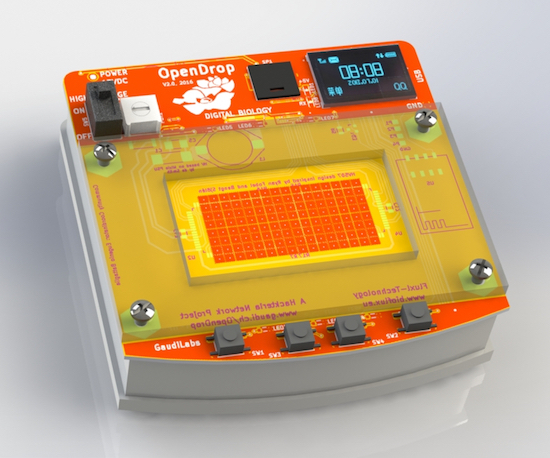
8-bit Frogger game on a digital microfluidics device

OpenDrop V2 is an updated design for an open-source digital microfludics platform, which was initiated by GaudiLabs in Luzern, Switzerland and developed by several communities including hackteria | open source biological art, BioFlux and digi.bio. The device is part of a much larger ecosystem focused around digital biology with hopes of making personal lab automation accessible to more people.

OpenDrop runs on a new technology called “electro-wetting” to control small droplets of liquids, which allows anyone to carry out digital biology experiments. Potential applications are not only limited to science, but the art, music, gaming and education fields as well.

One such example is OpenDropper, an 8-bit video game based on the OpenDrop. You can see it below!

Interested in learning more? Read all about the open-source microfluidics platform here.


Talking Arduino Tells GoPro What To Do

It’s 2017 and even GoPro cameras now come with voice activation. Budding videographers, rest assured, nothing will look more professional than repeatedly yelling at your camera on a big shoot. Hackaday alumnus [Jeremy Cook] heard about this and instead of seeing an annoying gimmick, saw possibilities. Could they automate their GoPro using Arduino-spoken voice commands?

It’s an original way to do automation, for sure. In many ways, it makes sense – rather than mucking around with trying to make your own version of the GoPro mobile app (software written by surfers; horribly buggy) or official WiFi remote, stick with what you know. [Jeremy] decided to pair an Arduino Nano with the ISD1820 voice playback module. This was then combined with a servo-based panning fixture – [Jeremy] wants the GoPro to pan, take a photo, and repeat. The Arduino sets the servo position, then commands the ISD1820 to playback the voice command to take a picture, before rotating again.

[Jeremy] reports that it’s just a prototype at this stage, and works only inconsistently. This could perhaps be an issue of intelligibility of the recorded speech, or perhaps a volume issue. It’s hard to argue that a voice control system will ever be as robust as remote controlling a camera over WiFi, but it just goes to show – there’s never just one way to get the job done. We’ve seen people go deeper into GoPro hacking though – check out this comprehensive guide on how to pwn your GoPro.


Filed under: Arduino Hacks, digital cameras hacks

The Soda Locker Vending Machine

With the rising popularity of electronic textbooks and laptops being used for schoolwork, the ubiquitous high school locker is becoming less and less necessary. So, students are left with a private storage space that they don’t really need. Why let it go to waste when you’re an enterprising young man with budding electronics and fabrication skills?

[Mistablik] is one such high school student who decided to take advantage of his unused locker. After a “wouldn’t it be cool if…” discussion with his friends, [Mistablik] decided to use his summer break to construct a soda vending machine that fit entirely within his school locker. Quite an ambitious project for a high school student, but the result speaks for itself.

Using an Arduino, coin acceptor, LCD screen, and a handful of other components, [Mistablik] started by prototyping the electronics in a shoebox. After his prototype was proven, he used his school’s laser cutter to fabricate an acrylic control panel and enclosure. Other than a couple of hurdles involving false coin triggers caused by static electricity, the process went smoothly and he was able to move onto the soda dispensing part of the build.

Because [Mistablik] was building this in his school locker, it was important that the build was entirely self-contained and that it wouldn’t require any modification to the locker itself. Once again he turned to the laser cutter to build a two-chute system for dispensing two varieties of soda. Using Fusion 360, he designed and 3D printed the dispenser mechanism.

The finished product fits nicely into his locker, and quickly became a source of chatter around the school. [Mistablik] even used the vending machine to ask his girlfriend to prom, a technique sure to win any geek lover’s heart. Vending machines are popular builds for hobbyists, as they are a fun way to combine electronics, mechanics, and programming. But, this project stands out for its unique requirements and inspiring story.

[thanks to Slartibartfast for the tip!]


Filed under: Arduino Hacks