Posts with «arduino» label

Build a 1930’s Style Dieselpunk Cellphone

Adafruit’s Fona microcontroller, with a GSM phone module, can be used to make your very own dieselpunk cellphone that can make calls and store contacts.

Read more on MAKE

The post Build a 1930’s Style Dieselpunk Cellphone appeared first on Make: DIY Projects and Ideas for Makers.

Enhance your keyboard with the SlideBar

Using a keyboard and mouse usually gets the job done, but if you want to navigate around a website or video, the process could be a little more efficient. It may not be a big deal to reach over and use your mouse and scroll wheel, but if you had this control on your keyboard, that tiny bit of time savings could add up over the thousands of times you do this.

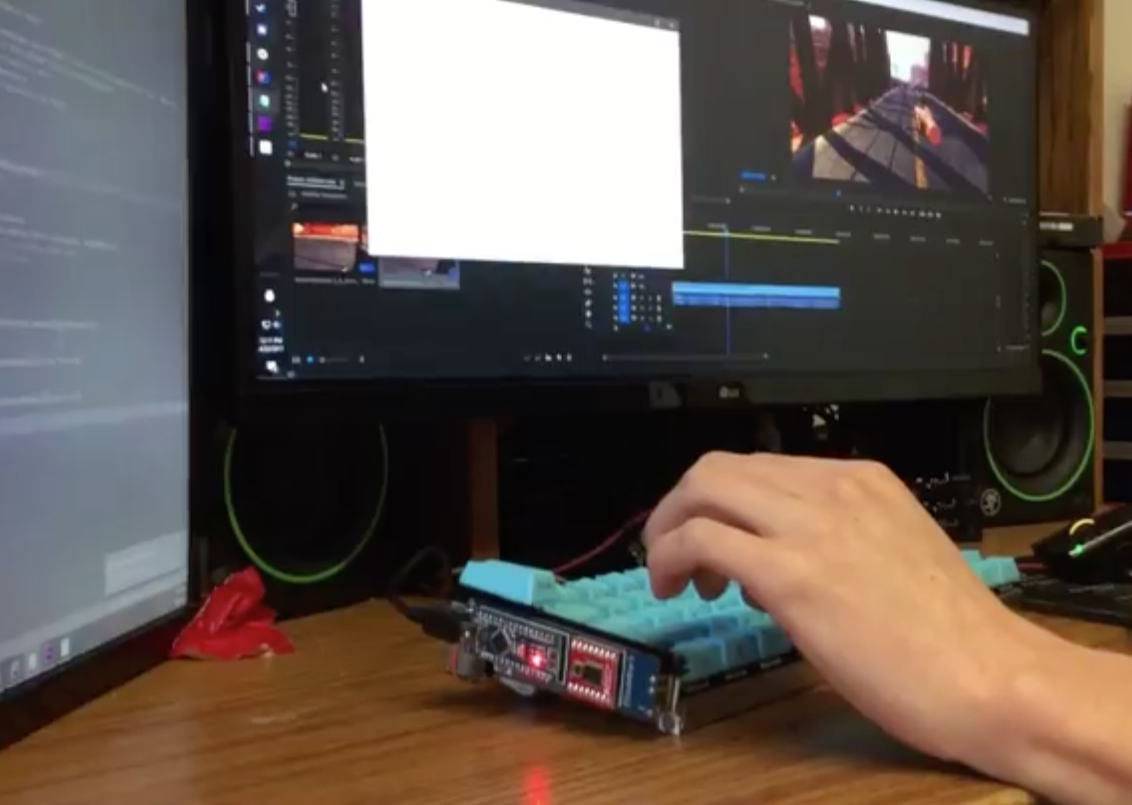
For this purpose, Imgur user “Electricrelay” added a motorized force feedback slider to his keyboard using an Arduino Nano for control. This easily customizable device can scroll through pages, or switch between open browser tabs or programs. It can also act as a mechanical display, shaking for notifications, or sliding with keystrokes like an old-school typewriter. The Maker even created a plugin for timeline scrubbing in Adobe Premiere.

Check out lots of example animations on the project’s Imgur page here and see it in action below!

Sous Vide Arduino isn’t Lost in Translation

If your idea of a six-course meal is a small order of chicken nuggets, you might have missed the rise of sous vide among cooks. The idea is you seal food in a plastic pouch and then cook it in a water bath that is held at a precise temperature. That temperature is much lower than you usually use, so the cook times are long, but the result is food that is evenly cooked and does not lose much moisture during the cooking process. Of course, controlling a temperature is a perfect job for a microcontroller and [Kasperkors] has made his own setup using an Arduino for control. The post is in Danish, but Google translate is frighteningly good.

The attractive setup uses an Arduino Mega, a display, a waterproof temperature probe, and some odds and ends. The translation does fall down a little on the parts list, but if you substitute “ground” for “earth” and “soil” you should be safe. For the true epicurean, form is as important as function, and [Kasperkors’] acrylic box with LEDs within is certainly eye-catching. You can see a video of the device, below.

The switches, LEDs, and relays are all pretty standard fare. The real heart of the project is the temperature control. Many controllers use a PID (proportional/integral/derivative) to hold the temperature, but this project takes a more pragmatic approach. Depending on how far from the set point the temperature is, the controller simply drives the heating element differently and measures more or less frequently to adjust. For example, if the temperature is more than two degrees low, the heating element is left on constantly. As it gets closer, though, the heating element runs for 10 seconds, there’s a 5 second wait, and then the algorithm reads the temperature again.

There’s a lot of debate about how precise the temperature has to be. Apparently, for things like fish, a wide range of temperatures isn’t a problem. Eggs, however, need tighter control because their proteins can denature (whatever that means).

There’s also a safety relay that shuts the whole affair down if the temperature goes very high or low so a bad temperature sensor won’t boil everything away. We might have considered doing that with a bimetallic coil so that even an Arduino failure would not stop it from working.

We’ve seen other attractive sous vide setups. Not to mention the more utilitarian builds made with a crock pot. No matter what it looks like, these projects are probably not going to help your waistline.


Filed under: Arduino Hacks

Unlock your garage door with a fingerprint

Using an Arduino Micro for control, French teenager “Joebarteam” came up with a way to biometrically secure his garage.

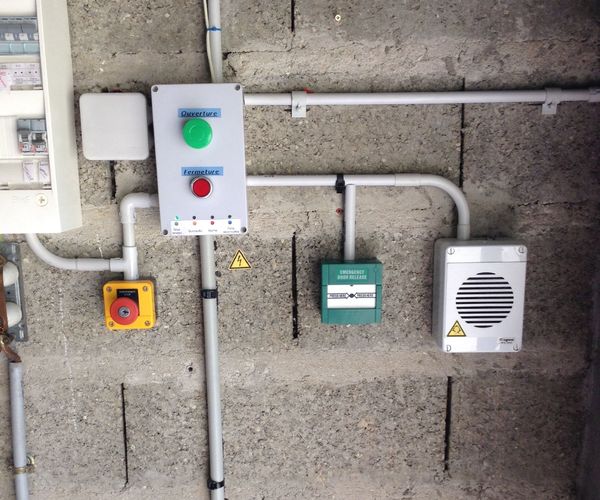
If you need to get into your locked garage, what could be better than using your fingerprint? To this end, Joe’ came up with a system that unlocks his door using a fingerprint scanner, and a bistable relay to disable communication between the scanner and the Arduino if there’s a problem.

It’s a really professional-looking build, and the locking mechanism is especially interesting. Two rack-and-pinion devices plunge shafts into the ground, making the door impossible to open (it has to pull out before going up). If there is an issue with the system, the pins can be physically unlocked and disabled as needed.

You can find more details on the project’s Instructables page here.

Look at me with your Special Animatronic Eyes

Animatronics for movies is often about making something that works and is reliable in the short term. It doesn’t have to be pretty, it doesn’t have to last forever. [Corporate Sellout]  shows us the minimalist approach to building animatronics with this pair of special eyes.  These eyes move in both the pan and tilt. Usually, that means a gimbal style mount. Not in this case. The mechanical assembly consists of with popsicle sticks, ping-pong balls, film canisters and dental floss.

The frame for the eyes is made of simple popsicle sticks hot glued together. The eyes themselves are simple ping-pong balls. Arduino powered servos control the movement. The servos are connected to dental floss in a cable arrangement known as a pull-pull system. As each servo moves, one side of the arm pulls on a cable, while the other provides enough slack for the ping-pong ball to move.

Mounting the ping-pong balls is the genius part of this build. They simply sit in the open end of a couple of film canisters. the tension from the dental floss holds everything together. We’re sure it was a finicky setup to build, but once working, it’s reliable. Only a glue joint failure or stretch in the dental floss could cause issues.

There are plenty of approaches to Animatronic eyes. Check out the eyes in this Stargate Horus helmet, which just won our Sci-Fi contest. More recently we saw Gawkerbot, which uses a CD-ROM drive to provide motion for a creepy robot’s eyes.


Filed under: classic hacks, robots hacks

The Lake Erie Mamba is a 12-servo snake robot

If you want to build a robot that moves across the ground, the normal options are wheels or legs of some kind. Maker “joesinstructables,” however, decided to do something a bit different. He created a versatile, slithering system, which he calls the “Lake Erie Mamba.”

He put a dozen Arduino Mega-controlled servos together in a reptile configuration to allow the robot to move via serpentine motion (like a normal snake), rectilinear motion (like a worm), or sidewinding (which snakes use in shifting terrain). It can also twist itself into a wheel and roll in this rather unnatural, though quite interesting way.

The Lake Erie Mamba contains 12 segments, each consisting of a servo motor, a C-bracket, a side bracket, a wire clip, and a set of LEGO wheels. The reconfigurable robot is not only controlled using a four-button key fob remote, but can move about autonomously via an IR sensor as well.

You can see more of this build on its Instructables page here and in action below!

Scare your friends with a 3D-printed animatronic eyeball

With October still six months away, you may not be thinking about Halloween decorations just yet. However, this Arduino-based ocular assembly could make for a spooky yet simple prop!

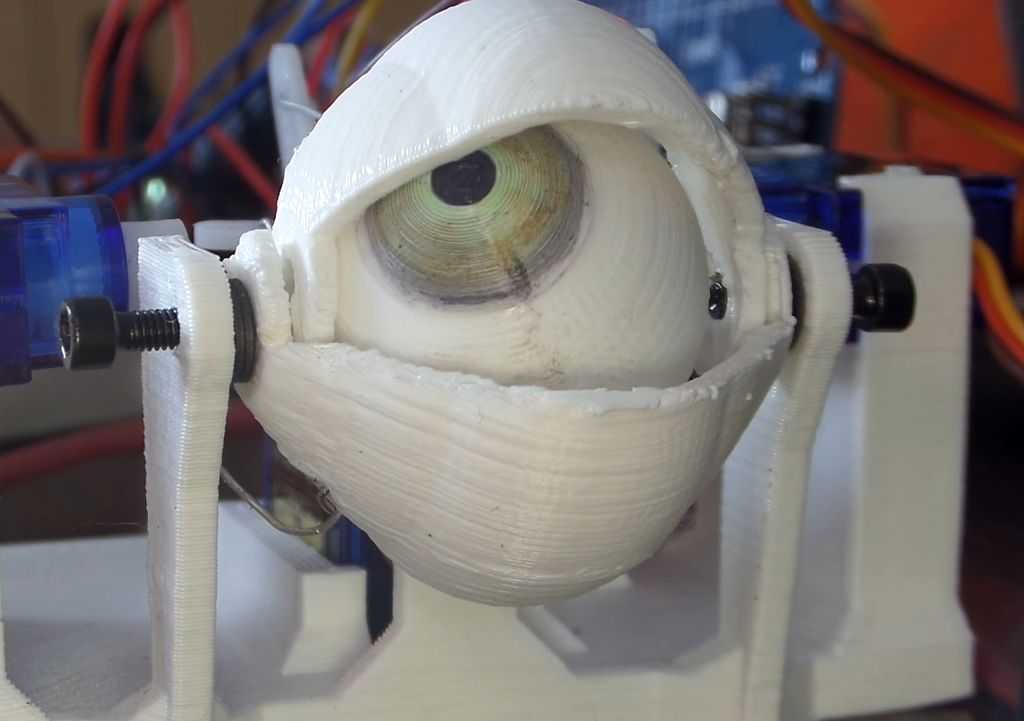
There are few things more unnerving than an eyeball or three looking at you from some concealed position—such as under clothing as in the project’s video. If you’d like to scare friends, family, or random visitors, Maker Will Cogley has the perfect solution with his 3D-printed animatronic eye and eyelid mechanism.

A joystick moves the eyeball around, while a small push-to-make switch blinks the eye and another potentiometer adjusts how wide open the eyelids are by default. The device itself, which can be controlled with any Arduino board capable of supporting four servos, took him a day to design and build, and should take much less time using his instructions, code, and STL files.

Want to create your own? You can find more details over on Cogley’s Instructables page here.

Automated Parts Counter Helps Build a Small Business

We love to see projects undertaken for the pure joy of building something new, but to be honest those builds are a dime a dozen around here. So when we see a great build that also aims to enhance productivity and push an entrepreneurial effort along, like this automated small parts counter, we sit up and take notice.

The necessity that birthed this invention is [Ryan Bates’] business of building DIY arcade game kits. The mini consoles seen in the video below are pretty slick, but kitting the nuts, bolts, spacers, and other bits together to ship out orders was an exercise in tedium. Sure, parts counting scales are a thing, but that’s hardly a walk-away solution. So with the help of some laser-cut gears and a couple of steppers, [Ryan] built a pretty capable little parts counter.

The interchangeable feed gears have holes sized to move specific parts up from a hopper to a chute. A photointerrupter counts the parts as they fall into plastic cups on an 8-position carousel, ready for bagging. [Ryan] also has a manual counter for wire crimp connectors that’s just begging to be automated, and we can see plenty of ways to leverage both solutions as he builds out his kitting system.

While we’ve seen more than a few candy sorting machines lately, it’s great to see someone building hardware to streamline the move from hobby to business like this. We’re looking forward to seeing where [Ryan] takes this from here.


Filed under: misc hacks, robots hacks

Teenage Maker builds his own Arduino drone

When most people decide they’re going to build a quadcopter, they likely go to their favorite online retailer or hobby shop, and get the correct parts to connect together.

17-year-old Maker Nikodem Bartnik instead decided to customize things further, programming an Arduino to act as his flight controller, and constructing a transmitter (or “pilot” as he refers to it) from scratch. Finally, he attempted to 3D print the frame, but after some difficulty chose to just buy one.

The rest of the electronics consisted of four motors, four ESCs, some propellers, two nRF24L01 radio modules, an MPU-6050, a LiPo battery, and a bunch of other small components. You can see more of Bartnik’s project over on Instructables, as well as check out “Ludwik” (named partially as a nod to Nikodem’s friend “lukmar”) flying quite nicely in the video below.

A robotic dancing teapot

You may have seen robots that wobble around, such as BOB, OTTO and ZOWI. Though their locomotion style of shifting the unit’s weight on huge feet is clever, they all share a rather similar look. French computer scientist Paul-Louis Ageneau decided to do something about this and created his own biped in the form of a dancing teapot a la Disney’s Beauty and the Beast.

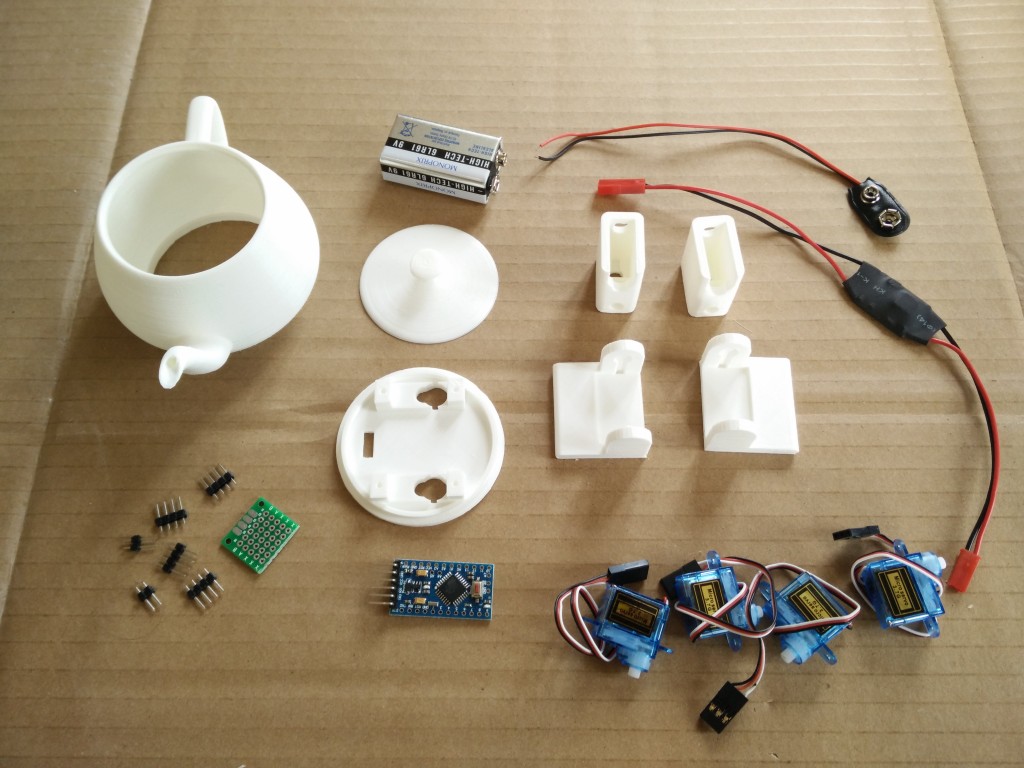
To accomplish this, he attached four servos to the robot’s hips and ankles, which were connected to an Arduino Pro Mini and powered by a 9V alkaline battery. All the electronics are housed inside the 3D-printed teapot. It’s a neat build in itself, and in a separate post he goes over how to play music on an Arduino, which should make this little guy even more entertaining!

You can find Ageneau’s original blog here, as well as the Disney-like bot’s code on GitHub.