Posts with «arduino» label

ATMega328 3D!

Small OLED displays are inexpensive these days–cheap enough that pairing them with an 8-bit micro is economically feasible. But what can you do with a tiny display and not-entirely-powerful processor? If you are [ttsiodras] you can do a real time 3D rendering. You can see the results in the video below. Not bad for an 8-bit, 8 MHz processor.

The code is a “points-only” renderer. The design drives the OLED over the SPI pins and also outputs frame per second information via the serial port.

As you might expect, 3D output takes a good bit of math, and the chip in question isn’t very good at handling real numbers. [Ttsiodras] handles this using an old technique: fixed point arithmetic. The idea is simple. Normally, we think of a 16-bit word as holding unsigned values of 0 – 65535. However, if you choose, you can also use it to represent numbers from 0-50.999, for example. Mentally, you scale everything by 1,000 and then reverse the operation when you want to output. Addition and subtraction are straightforward, but multiplication and division require some extra work.

If you want to read more about fixed point math, you are in the right place. We’ve also covered a great external tutorial, too. But if you think this is the first time we’ve covered a 3D graphics engine for the ATmega parts, you’re wrong.


Filed under: Arduino Hacks

Maker Pro News: The Maker Pros of DEF CON, Shakeup at Arduino, and More

This past week, maker professionals learned about new security measures for their projects and found solace in Arduino's new leadership.

Read more on MAKE

The post Maker Pro News: The Maker Pros of DEF CON, Shakeup at Arduino, and More appeared first on Make: DIY Projects and Ideas for Makers.

Maker Pro News: The Maker Pros of DEF CON, Shakeup at Arduino, and More

This past week, maker professionals learned about new security measures for their projects and found solace in Arduino's new leadership.

Read more on MAKE

The post Maker Pro News: The Maker Pros of DEF CON, Shakeup at Arduino, and More appeared first on Make: DIY Projects and Ideas for Makers.

Keep Pedaling to Keep Playing

It’s been said that the best way to tackle the issue of childhood obesity would be to hook those children’s video game consoles up to a pedal-powered generator. Of course, this was said by [Alex], the creator of Cykill. Cykill interfaces an Xbox to an exercise bike, so to keep the video game going you’ll have to keep pedaling the bike.

While there is no generator involved in this project, it does mimic the effect of powering electronics from a one. The exercise bike has a set of communications wires, which are connected to a relay on the Xbox’s power plug. When the relay notices that the bike isn’t being pedaled enough, it automatically cuts power to the console. Of course, the risk of corrupting a hard drive is high with this method, but that only serves to increase the motivation to continue pedaling.

The project goes even further in order to eliminate temptation to bypass the bike. [Alex] super-glued the plug of the Xbox to the relay, making it extremely difficult to get around the exercise requirement. If you’re after usable energy instead of a daily workout, though, there are bikes out there that can power just about any piece of machinery you can imagine.


Filed under: xbox hacks
Hack a Day 08 Aug 12:00

15-year-old Maker builds his own $60 AR headset

Instructables author Daniel Quintana loves mountain biking, but after having to interrupt a ride to continuously check the time, he did what any normal teenager would do in this situation: he created his own Google Glass-like headset from scratch.

His DIY AR device, called “Uware,” takes the form of a 3D-printed enclosure with a tiny 0.49″ OLED screen stuffed inside, along with an HC-06 Bluetooth module, an APDS-9960 gesture sensor, a 3.7V battery, and of course, a tiny Arduino Pro Mini for control.

In normal usage, the wearable displays the time and text messages transmitted from Quintana’s phone over Bluetooth via a custom app that he wrote. Swiping right in front of the gesture sensor puts it into camera mode, allowing him to capture the environment hands-free!

Want to see more? You can find Quintana’s write-up here, or check out Uware’s prototype electronics setup and custom magnetic charging rig in the videos below!

Dedicated Button for Toggling Screens

Anyone who regularly presents to an audience these days has known the pain of getting one’s laptop to work reliably with projection hardware. It’s all the more fraught with pain when you’re hopping around from venue to venue, trying desperately to get everything functioning on a tight schedule. [Seb] found that the magic keystrokes they used to deal with these issues no longer worked on the Macbook Pro Touchbar, and so a workaround was constructed in hardware.

The build itself is simple – an Adafruit Trinket serves as the brains, with a meaty 12mm tactile button used for input. The Trinket emulates a USB keyboard and sends the Cmd-F1 keypress to the computer when the button is pressed. The button’s even mounted in a tidy deadbugged fashion.

While it’s not at all complicated from a build standpoint, the key to this project is that it’s a great example of using the tools available to solve real-life problems. When you’re in a rush with 300 people waiting for your talk to start, the last thing you need to be worrying about is a configuration issue. [Seb] now has a big red button to mash to get out of trouble and get on with the job at hand. It does recall this much earlier hack for emulating a USB keyboard with an Arduino Uno or Mega. It’s a useful skill to have!


Filed under: news

Weekend Watch: The Madcap Robot World of Junie Genius

Teen maker Junie Genius attempts to solve problems with crazy robot creations.

Read more on MAKE

The post Weekend Watch: The Madcap Robot World of Junie Genius appeared first on Make: DIY Projects and Ideas for Makers.

Weekend Watch: The Madcap Robot World of Junie Genius

Teen maker Junie Genius attempts to solve problems with crazy robot creations.

Read more on MAKE

The post Weekend Watch: The Madcap Robot World of Junie Genius appeared first on Make: DIY Projects and Ideas for Makers.

This alarm clock will steal the covers right off your bed

When you hear the words “Arduino alarm clock,” likely you think of something that uses a real-time clock (RTC) module to wake one up in a creative way, perhaps with light patterns or pleasant sounds. Though creative, the Duvet Eating Alarm Clock is not pleasant, literally ripping the covers off of your bed for a very “rude awakening.”

This project, the brainchild of YouTuber “1up Living,” uses a modified mechanical alarm clock to signal an Arduino Uno to start the duvet stealing machine. A powerful winch turns a custom-made drum that progressively wraps the bed cover around it, leaving no option but to get up and get dressed!

If you need a little more motivation in the morning, you can find 1up Living’s build instructions here.

Mini Hacker Breaks Down How To Build It

I read the other day that the hot career choice for kids these days is: YouTuber. That means every kid — yes, including mine — has two or three attempts at a YouTube show on their account and then they get into the next big thing and forget about it. On the other hand, sometimes you find someone who has a lot of ideas to share, and the dedication to keep sharing them.
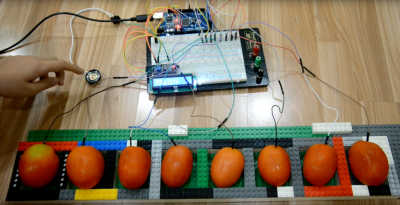
[Kevin Zhou], an 11-year-old from Indonesia, has filmed around  70 videos in the past couple of years, with a fantastic variety of nerdy projects ranging from Mindstorms to Arduino to wood shop projects, and even a Blender tutorial. His projects show a lot of complexity, with serious, real-world concepts, and he shares the technical details about the various components in the project, and he walks you through the code as well.

He made a Mindstorms carving machine, pictured above, with a gantry system holding a motor steady while the user carves into a block of floral foam with LEGO bits. He does a lot of home automation projects using an Arduino and relay board, as well as a number of water-pumping robots. He doesn’t stick to one medium or technology. He has a jigsaw and in one video he shows how to build a Thor’s hammer out of wood. He prints out each layer’s design on office paper and glues the paper to a piece of wood, cutting out the cross-sections on his jigsaw. The whole stack is glued together and clamped. [Kevin]’s design featured a hollow space inside to save weight, which he cut by drilling a 1-inch hole in the center with his drill press, then threading the jigsaw blade through the hole to cut out the inside. As an amateur woodcrafter myself, I like seeing him branching out working on small wood projects.
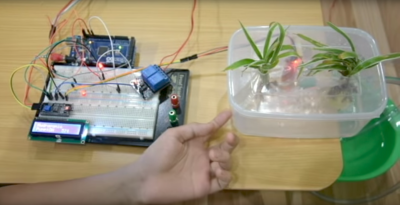
[Kevin]’s full automatic water dispenser is one of a series of water-pumping projects including a couple of plant-watering robots. [Kevin] uses a relay-triggered pump and a water-level sensor, all running on an Arduino Mega plugged into a 1360-point breadboard.

He has a lot of common modules. He uses a LED display plugged directly into the breadboard, with its backpack plugged into same rows so it can lay flat. He plays around with an IR remote, as well as a 12 V / 5 A Peltier thermo-electric cooler running off of a relay. He has a couple of different relay boards making for a number of home automation projects, including a fairly complicated security system featuring RFID and keypad entry.

There are many LEGO and Mindstorms projects as well, including a complicated robot arm controlled by a smartphone app, as well as a Technic beam sorter that rolls the beams down a conveyor so that shorter elements fall through smaller holes, while longer pieces continue on to fall in larger holes down the line. Intriguingly to me, he did a couple of projects involving mixing Arduinos and LEGO/Mindstorms, and frequently uses the building set to build enclosures and support structure.

I suppose you could say the individual projects aren’t that challenging–connecting a relay board to an Arduino, for instance. All of these parts are fairly simple to run individually but together show he’s been working at this for a long time: 70 videos. A DIY security system is a far cry from turning on a LED.

Besides, I like how [Kevin] finishes projects, then riffs off of them. He tries out a few variants in a row, making changes and improvements. I just hope he keeps building–I can’t imagine what he’ll be making fifteen years from now.

Check out some of his videos:


Filed under: Arduino Hacks, Featured