Posts with «arduino» label

An Arduino vibe bowl screw feeder

Vibratory bowls, which feed small parts up a long curved ramp, are essential elements in many types of automated manufacturing. While the video seen here doesn’t get into how the bowls themselves are made, a crucial part of the setup is the ramp on the end, which controls how items exiting the bowl are aligned.

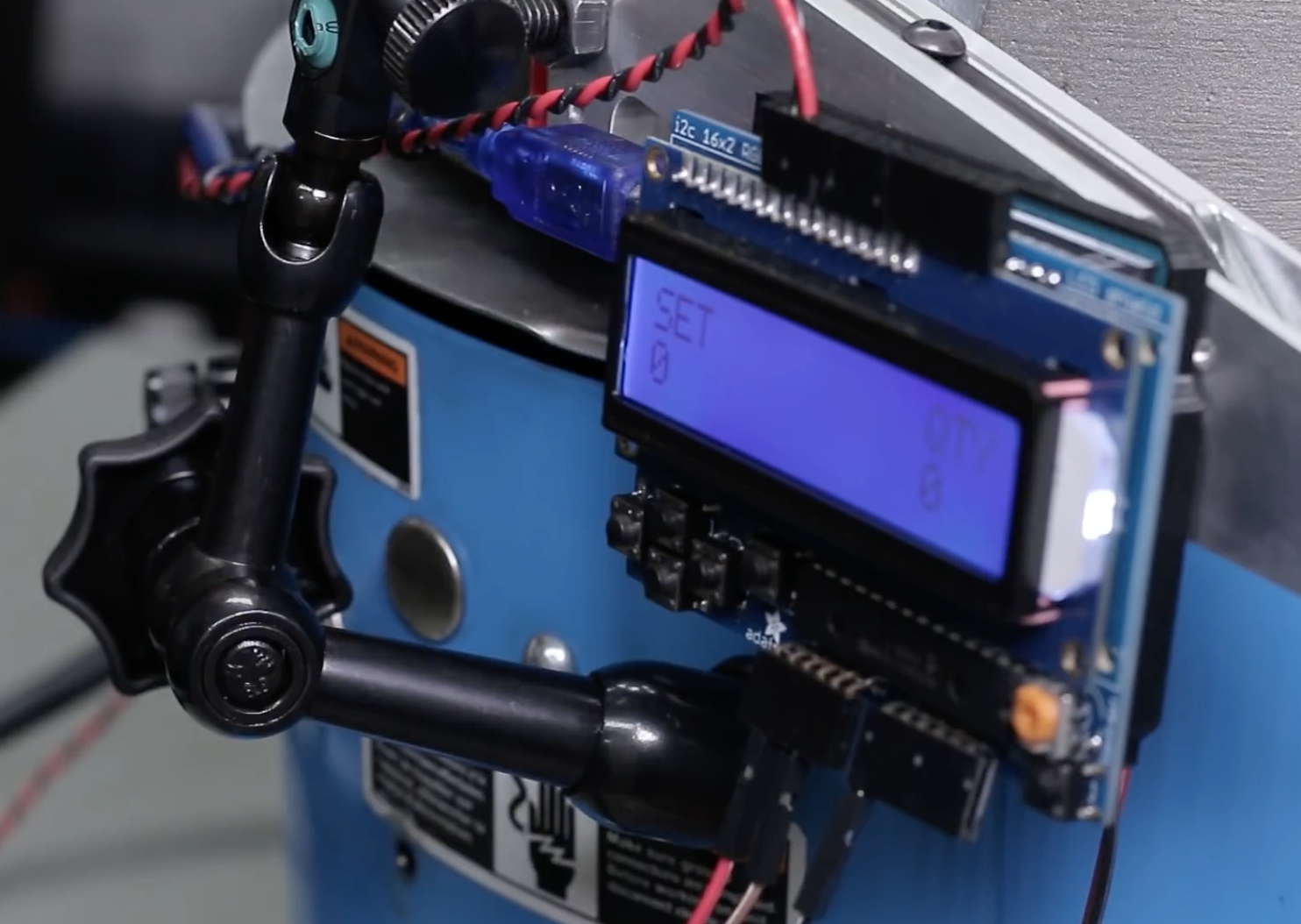
In the clip below, NYC CNC’s John Saunders machines a feed ramp and proceeds to integrate an Arduino Uno after the 21:00 mark, which uses a photo interrupt sensor to count how many parts have exited the bowl.

Once the proper number has been attained, it can then switch things off as needed using a PowerSwitch Tail. It’s a great setup for testing out the design before being put to use. Code and parts for the project can be found here.

Turn your raspberry pi robot into internet controlled telepresence robot.

Hi guys, 

My name is Jill, and I've been working on an open telepresence platform (letsrobot.tv) for any kind of robot you can think of, and i wanted to open it up to more people. It's kind of a cross between telepresence and live-streaming. You can basically hook up any robot that can run our software to the site for anyone on the internet to control. We have an API & documentation to help you get started.

read more

Turn your raspberry pi robot into internet controlled telepresence robot.

Hi guys, 

My name is Jill, and I've been working on an open telepresence platform (letsrobot.tv) for any kind of robot you can think of, and i wanted to open it up to more people. It's kind of a cross between telepresence and live-streaming. You can basically hook up any robot that can run our software to the site for anyone on the internet to control. We have an API & documentation to help you get started.

read more

Ivy is a massive 240-step sequencer

Most musical sequencers use an array of buttons to control sounds played in 16 or perhaps 32 steps. As seen here, Moscow-based artist Dmitry Morozov (aka ::vtol::) created an installation called “Ivy” wth not 16, but 240!

The sequencer is based on an Arduino Mega along with 74HC40967 multiplexers to handle input from the 240 sliders arranged as controls for each step.  There’s also a bunch of WS2811 LEDs, which are driven by a Teensy board.

Ivy stretches five meters in length, and several “voices” represented by dots on the 1-dimensional light array travel both right and left at different speeds simultaneously. This allows it to be programmed in ways that wouldn’t be possible with traditionally-operated musical devices.

The project is created specially for Open Codes exhibition in ZKM center, dedicated to codes and programming in art. On one side, Ivy is a representation of an archaic method of electronic music programming for analog synthesizers. On the other side – gigantic scale and obsessive multiplication of simple primitive elements turns this project into an art installation, that is referring to the topic of graphic and physical organization of parameters in electronic music.

You can read more about ::vtol::’s latest sound installation here, and see it in action below!

Arduino Blog 24 Oct 19:27

Building an ALS communication device with Arduino

The father of hacker Ricardo Andere de Mello’s good friend has ALS. His symptoms have become worse recently, causing the loss of much of his motor control. To help with the situation, de Mello decided to build a device that would enable him to communicate with his family.

What he came up with was a finger-mounted accelerometer that senses movement, and feeds data to a computer using an Arduino Uno, updated for HMI use. The computer then allows the ALS patient to speak via the same ACAT software used by Steven Hawking.

The result is a system that is very affordable, and that can hopefully help a lot of people with this and other debilitating conditions. For more information, be sure to check out the project’s write-up and watch its demo videos below.

Tiny, Wearable 8-Bit VT100 Terminal

In the modern era of computing, the end-user is often quite far removed from the machine they’re using. At least in terms of abstraction levels, the user experience of most computers, smart phones, and the like are very far away from the zeros and ones. If you need to get down to that level though, you’ll have to make your way to a terminal somehow, and reminisce fondly about the days when everything was accessed through a serial line.

Nowadays, some harmless nostalgia is often accompanied by a challenge as well, as [Nick] demonstrated with his tiny serial terminal. It mimics the parsing and rendering of a VT100 console using an Arduino Uno and a 1″x1″ TFT screen. His goal was to make it wearable like a wristwatch would be, using two buttons as an HID device. With the size and simple interface, [Nick] also explores the possibility of mounting such a terminal to a pair of glasses.

While not everyone may want to interact with a serial terminal with only two buttons, it’s certainly a great demonstration of what is possible when it comes to implementing retro software in unique ways. There have been serial terminals implemented in many other unique places as well, such as old oscilloscopes and replicas from popular video games.


Filed under: Arduino Hacks

Students invent a low-cost electric wheelchair kit with Arduino

While electric wheelchairs are a vital tool for those with restricted mobility, they typically cost around $2,500, an amount that’s not the most affordable. To address this problem, a group of students from Aviv High School in Israel have come up with a low-cost, 3D-printed motor conversion kit that connects to a standard push-chair without any permanent modification or damage.

The system uses a pair of motors to steer like a tank, and features a joystick and Arduino Uno for control. Another interesting feature is shown later in the video below, when it’s folded up for storage with the motor kit still attached.

You can check out the team’s website for more details this incredible project, as well as All3DP’s recent article here.

Using an Arduino to Re-Create a Computer’s Keyboard Decoder

[Max Breedon] found an old Apple IIe clone twenty years ago. He recently dug this Epson AP-200 out of the salvage heap and quickly discovered that the keyboard decoder chip was fried. The old chip was way too obscure to source a replacement — and soon this post will be the top Google result for the string, ‘C35224E’ — so he busted out his trusty UNO and created a replacement keyboard decoder.

Unlike the Apple II, where all the keyboard decoding happens on the keyboard, this clone used a dedicated chip on the main board. Although it’s a rare part that’s virtually ungoogleable, this chip’s architecture and pinout can be figured out by testing out every trace for continuity. After locating what looked like four data pins, he had the Arduino send signals onto the clone to see what characters popped up. That didn’t work, but it led him to idea that two of the wires were clock and data, and after a bit of experimenting figured out that the third pin was a latch enable of some sort that sent the character.

So, [Max] created an Arduino rig to do the same thing. The Arduino uses a shift register to interact with the keyboard’s 8×10 matrix, and the sketch translates any serial data it receives into the keypresses the clone is expecting. After prototyping with the UNO, [Max] hardwired an Arduino Nano (as well as the shift register) into a daughter board with pins extending into the old chip’s sockets. A permanent solution!

In addition to a weird keyboard controller that has been lost to the sands of time, this Apple IIe clone features a few more parts that are downright weird. There are two chips that are found in a few other Apple clones labeled STK 65301 and STK 65371, used as ASICs, MMUs, or a 20-IC expression of Wozzian brilliance condensed into custom silicon. There’s another weird chip in this clone, a 27c32 ROM loaded up with repetitive bits. There is no obvious 6502 code or strings in this ROM, so if anyone has an idea what this chip does, send [Max] a note.


Filed under: repair hacks

Look what came out of my USB charger !

Quick Charge, Qualcomm’s power delivery over USB technology, was introduced in 2013 and has evolved over several versions offering increasing levels of power transfer. The current version — QCv3.0 — offers 18 W power at voltage levels between 3.6 V to 20 V.  Moreover, connected devices can negotiate and request any voltage between these two limits in 200 mV steps. After some tinkering, [Vincent Deconinck] succeeded in turning a Quick Charge 3.0 charger into a variable voltage power supply.

His blog post is a great introduction and walk through of the Quick Charge ecosystem. [Vincent] was motivated after reading about [Septillion] and [Hugatry]’s work on coaxing a QCv2.0 charger into a variable voltage source which could output either 5 V, 9 V or 12 V. He built upon their work and added QCv3.0 features to create a new QC3Control library.

To come to grips with what happens under the hood, he first obtained several QC2 and QC3 chargers, hooked them up to an Arduino, and ran the QC2Control library to see how they respond. There were some unexpected results; every time a 5 V handshake request was exchanged during QC mode, the chargers reset, their outputs dropped to 0 V and then settled back to a fixed 5 V output. After that, a fresh handshake was needed to revert to QC mode. Digging deeper, he learned that the Quick Charge system relies on specific control voltages being detected on the D+ and D- terminals of the USB port to determine mode and output voltage. These control voltages are generated using resistor networks connected to the microcontroller GPIO pins. After building a fresh resistor network designed to more closely produce the recommended control voltages, and then optimizing it further to use just two micro-controller pins, he was able to get it to work as expected. Armed with all of this information, he then proceeded to design the QC3Control library, available for download on GitHub.

Thanks to his new library and a dual output QC3 charger, he was able to generate the Jolly Wrencher on his Rigol, by getting the Arduino to quickly make voltage change requests.


Filed under: Arduino Hacks, hardware

The Weather Followers randomizes your digital experience

As our lives become more and more automated, we tend to rely on computers and unseen algorithms to “protect” us from unapproved experiences. In order to illustrate this concept, and hopefully introduce serendipitous events to our digital lives, David Columbini has come up with an installation that feeds information to users via a web app, available only when it’s on display.

Instead of implementing a carefully designed algorithm, what users experience is based on constantly evolving local weather data sensed by a physical machine equipped with an Arduino Mega, a Raspberry Pi, various sensors, and some other components.

“The Weather Followers” is comprised of four different instruments: a wind-driven messaging app, a pollution-distorted selfie tool, a music player based on the rhythm of rain, and even a device that erases your feed depending on the sun’s intensity!

The installation is comprised of two elements, the four weather instruments and the webapp. Users are invited to connect to the weather machine through the webapp and choosing between one of the four weather instruments: Windy encounters (when your digital social life follows the wind), Polluted Selfie (when your digital individual life follows the pollution), Drizzly Rhythms (when your digital audio life follows the rain) and finally Sun(e)rase (when your digital overwhelming life follows the sun).

More details on the project can be found here. If you want to see another weather/digital world combination by Columbini, be sure to check out this balloon messaging system!