Posts with «arduino» label

Squishy Tech: DMX Lighting for Makers

DMX controls are the brains behind big-time performances and events. Set up this professional stage lighting protocol with just an Arduino!

The post Squishy Tech: DMX Lighting for Makers appeared first on Make: DIY Projects and Ideas for Makers.

MAKE » Arduino 08 Apr 18:18

Tracking the ISS Made Easy

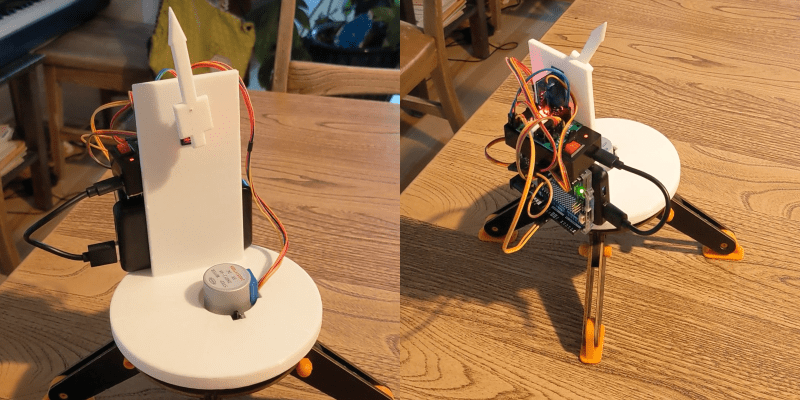
If you made something blink, and now it’s time for you to make something move, something like a point-to-a-satellite tracker is a great idea. [Farid Rener] made this moving arrow that always points at the ISS, and documented it nicely to boot.

And there’s a little bit of everything here, from orbital mechanics and fetching the two-line elements (TLE) from the web, to writing the code to translate that into the tabletop machine’s coordinate system. It looks like [Farid] hadn’t done much 3D CAD before, so he got a chance to stretch those muscles too. Finally, it served as an introduction to resource-constrained programming: “This was the first time I’ve had to think about the size of a compiled binary – the most frustrating part was figuring out that using a C++ stringstream was adding too much code to my binary.”

[Farid] is learning a lot here, and you might too. For instance, using pencil lead (graphite) as a lubricant on sliding 3D-printed parts is new to us, but makes sense. We’ll have to try that out.

And while this is a simple desktop tracker, with a lot more mechanical design, the same basics could be put to real use for pointing a receiver dish. Of course, who says you need fancy motors and computers to point a satellite dish anyway? If you work on your arm muscles a bit, you could become the satellite pointer.

Automatically Crack Safes with this Autodialer

When attempting to secure something, whether it’s a computer, sensitive data, or valuables, there’s always going to be a way to break that security. It might be impossibly hard, like taking centuries to brute-force an encryption algorithm, but it’s weakness is still there. And, like the future might make certain encryption obsolete, modern electronics has made security of the past somewhat obsolete as well. [Startup Chuck] has been using tools the creators of safes from the late 1800s could probably not have imagined.

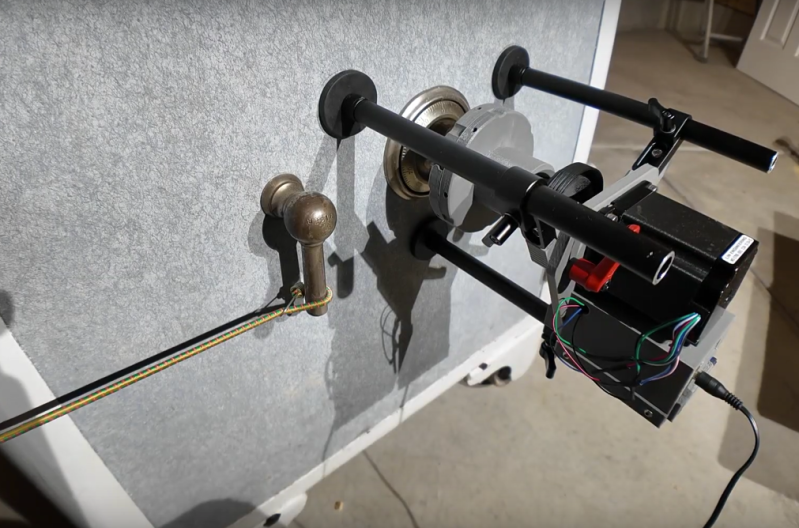
The tool that [Startup Chuck] has come up with is known as an autodialer in the safe-cracking world, and as its name suggests it automates the process of opening the safe by trying as many combinations as possible. The autodialer attaches to the safe with three magnetic feet and couples to the dial through a chuck attached to a magnetic clutch, which allows the autodialer to disengage as soon as the correct combination is found. It’s driven with a stepper motor which can test out combinations so fast that [Startup Chuck] needed to take 240 fps video and slow it down to make sure that the mechanism was behaving properly.

The autodialer itself can’t actually open the safe, though. The last step of the process is taken care of by a bungie cord, attached to the safe handle to pre-tension it enough so that when the correct combination is finally entered the safe pops open automatically. For anyone looking to duplicate the project, [Startup Chuck] has added the program code to a GitHub page. If you’re looking at a more modern safe, though, there are of course ways to crack their security systems as well.

Laser Harp Sets the Tone

In many ways, living here in the future is quite exiting. We have access to the world’s information instantaneously and can get plenty of exciting tools and hardware delivered to our homes in ways that people in the past with only a Sears catalog could only dream of. Lasers are of course among the exciting hardware available, which can be purchased with extremely high power levels. Provided the proper safety precautions are taken, that can lead to some interesting builds like this laser harp which uses a 3W laser for its strings.

[Cybercraftics]’ musical instrument is using a single laser to generate seven harp strings, using a fast stepper motor to rotate a mirror to precise locations, generating the effect via persistence of vision. Although he originally planned to use one Arduino for this project, the precise timing needed to keep the strings in the right place was getting corrupted by adding MIDI and the other musical parts to the project, so he split those out to a second Arduino.

Although his first prototype worked, he did have to experiment with the sensors used to detect his hand position on the instrument quite a bit before getting good results. This is where the higher power laser came into play, as the lower-powered ones weren’t quite bright enough. He also uses a pair of white gloves which help illuminate a blocked laser. With most of the issues ironed out, [Cybercraftics] notes that there’s room for improvement but still has a working instrument that seems like a blast to play. If you’re still stuck in the past without easy access to lasers, though, it’s worth noting that there are plenty of other ways to build futuristic instruments as well.

Taming the Wobble: An Arduino Self-Balancing Bot

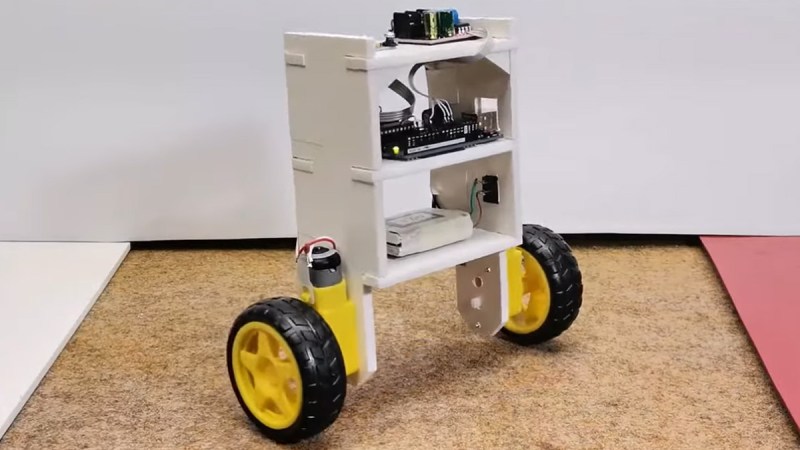
Getting a robot to stand on two wheels without tipping over involves a challenging dance with the laws of physics. Self-balancing robots are a great way to get into control systems, sensor fusion, and embedded programming. This build by [mircemk] shows how to make one with just a few common components, an Arduino, and a bit of patience fine-tuning the PID controller.

At the heart of the bot is the MPU6050 – a combo accelerometer/gyroscope sensor that keeps track of tilt and movement. An Arduino Uno takes this data, runs it through a PID loop, and commands an L298N motor driver to adjust the speed and direction of two DC motors. The power comes from two Li-ion batteries feeding everything with enough juice to keep it upright. The rest of the magic lies in the tuning.

PID (Proportional-Integral-Derivative) control is what makes the robot stay balanced. Kp (proportional gain) determines how aggressively the motors respond to tilting. Kd (derivative gain) dampens oscillations, and Ki (integral gain) helps correct slow drifts. Set them wrong, and your bot either wobbles like a confused penguin or falls flat on its face. A good trick is to start with only Kp, then slowly add Kd and Ki until it stabilizes. Then don’t forget to calibrate your MPU6050; each sensor has unique offsets that need to be compensated in the code.

Once dialed in, the result is a robot that looks like it defies gravity. Whether you’re hacking it for fun, turning it into a segway-like ride, or using it as a learning tool, a balancing bot is a great way to sharpen your control system skills. For more inspiration, check out this earlier attempt from 2022, or these self-balancing robots (one with a little work) from a year before that. You can read up on [mircemk]’s project details here.

Physical Computing Used to be a Thing

In the early 2000s, the idea that you could write programs on microcontrollers that did things in the physical world, like run motors or light up LEDs, was kind of new. At the time, most people thought of coding as stuff that stayed on the screen, or in cyberspace. This idea of writing code for physical gadgets was uncommon enough that it had a buzzword of its own: “physical computing”.

You never hear much about “physical computing” these days, but that’s not because the concept went away. Rather, it’s probably because it’s almost become the norm. I realized this as Tom Nardi and I were talking on the podcast about a number of apparently different trends that all point in the same direction.

We started off talking about the early days of the Arduino revolution. Sure, folks have been building hobby projects with microcontrollers built in before Arduino, but the combination of a standardized board, a wide-ranging software library, and abundant examples to learn from brought embedded programming to a much wider audience. And particularly, it brought this to an audience of beginners who were not only blinking an LED for the first time, but maybe even taking their first steps into coding. For many, the Arduino hello world was their coding hello world as well. These folks are “physical computing” natives.

Now, it’s to the point that when Arya goes to visit FOSDEM, an open-source software convention, there is hardware everywhere. Why? Because many successful software projects support open hardware, and many others run on it. People port their favorite programming languages to microcontroller platforms, and as they become more powerful, the lines between the “big” computers and the “micro” ones starts to blur.

And I think this is awesome. For one, it’s somehow more rewarding, when you’re just starting to learn to code, to see the letters you type cause something in the physical world to happen, even if it’s just blinking an LED. At the same time, everything has a microcontroller in it these days, and hacking on these devices is also another flavor of physical computing – there’s code in everything that you might think of as hardware. And with open licenses, everything being under version control, and more openness in open hardware than we’ve ever seen before, the open-source hardware world reflects the open-source software ethos.

Are we getting past the point where the hardware / software distinction is even worth making? And was “physical computing” just the buzzword for the final stages of blurring out those lines?

This article is part of the Hackaday.com newsletter, delivered every seven days for each of the last 200+ weeks. It also includes our favorite articles from the last seven days that you can see on the web version of the newsletter. Want this type of article to hit your inbox every Friday morning? You should sign up!

What’s New in the Microchip Maker Space

Join the Wizard of Make, Microchip's Bob Martin for an update on the latest developments in the Arduino / Maker Space ecosystem.

The post What’s New in the Microchip Maker Space appeared first on Make: DIY Projects and Ideas for Makers.

How to Choose the Right Board for the Classroom

Teachers have a lot to navigate when selecting a circuit board for classroom use. Here's how to narrow down the choices and choose the right one for you or your students.

The post How to Choose the Right Board for the Classroom appeared first on Make: DIY Projects and Ideas for Makers.

Making Intel Mad, Retrocomputing Edition

Intel has had a deathgrip on the PC world since the standardization around the software and hardware available on IBM boxes in the 90s. And if you think you’re free of them because you have an AMD chip, that’s just Intel’s instruction set with a different badge on the silicon. At least AMD licenses it, though — in the 80s there was another game in town that didn’t exactly ask for permission before implementing, and improving upon, the Intel chips available at the time.

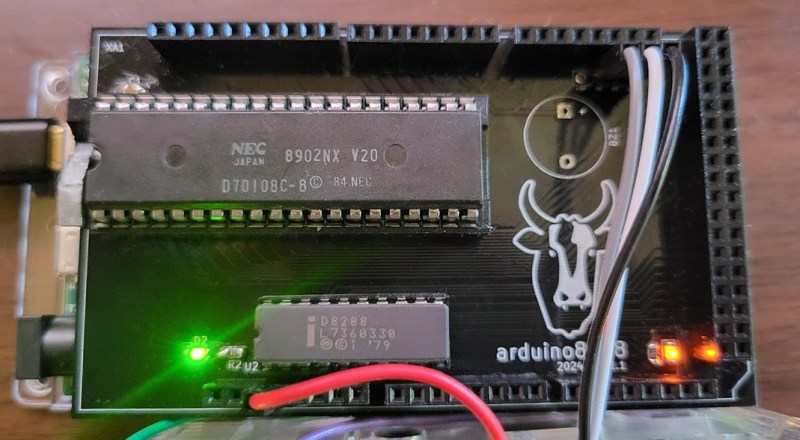
The NEC V20 CPU was a chip that was a drop-in replacement for the Intel 8088 and made some performance improvements to it as well. Even though the 186 and 286 were available at the time of its release, this was an era before planned obsolescence as a business model was king so there were plenty of 8088 systems still working and relevant that could take advantage of this upgrade. In fact, the V20 was able to implement some of the improved instructions from these more modern chips. And this wasn’t an expensive upgrade either, with kits starting around $16 at the time which is about $50 today, adjusting for inflation.

This deep dive into the V20 isn’t limited to a history lesson and technological discussion, though. There’s also a project based on Arduino which makes use of the 8088 with some upgrades to support the NEC V20 and a test suite for a V20 emulator as well.

If you had an original IBM with one of these chips, though, things weren’t all smooth sailing for this straightforward upgrade at the time. A years-long legal battle ensued over the contents of the V20 microcode and whether or not it constituted copyright infringement. Intel was able to drag the process out long enough that by the time the lawsuit settled, the chips were relatively obsolete, leaving the NEC V20 to sit firmly in retrocomputing (and legal) history.

Hack a Day 09 Jun 21:00
186  286  8088  arduino  emulator  ibm  nec v20  pc  retrocomputing  upgrade  v20  

2024 Business Card Challenge: Tiny MIDI Keyboard

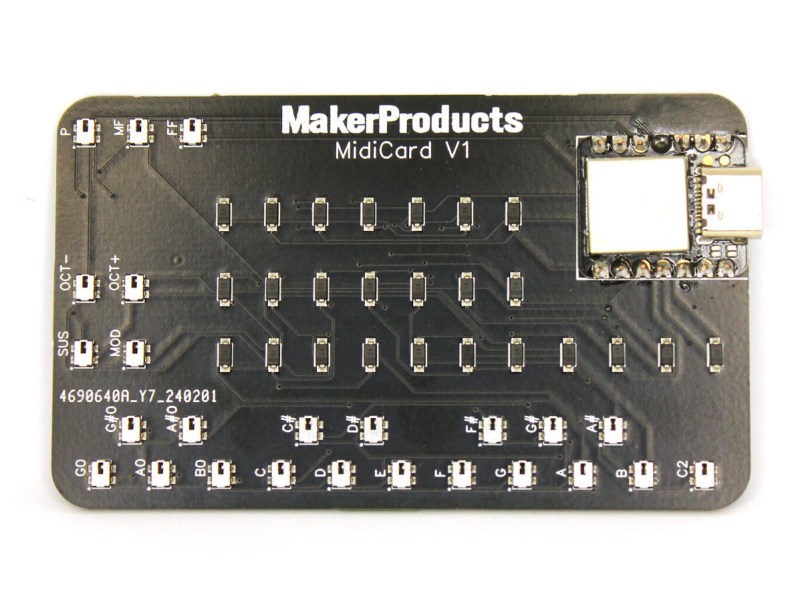
The progress for electronics over the past seven decades or so has always trended towards smaller or more dense components. Moore’s Law is the famous example of this, but even when we’re not talking about transistors specifically, technology tends to get either more power efficient or smaller. This MIDI keyboard, for example, is small enough that it will fit in the space of a standard business card which would have been an impossibility with the technology available when MIDI first became standardized, and as such is the latest entry in our Business Card Challenge.

[Alana] originally built this tiny musical instrument to always have a keyboard available on the go, and the amount of features packed into this tiny board definitely fits that design goal. It has 18 keys with additional buttons to change the octave and volume, and has additional support for sustain and modulation as well. The buttons and diodes are multiplexed in order to fit the IO for the microcontroller, a Seeed Studio Xiao SAMD21, and it also meets the USB-C standards so it will work with essentially any modern computer available including most smartphones and tablets so [Alana] can easily interface it with Finale, a popular music notation software.

Additionally, the project’s GitHub page has much more detail including all of the Arduino code needed to build a MIDI controller like this one. This particular project has perhaps the best size-to-usefulness ratio we’ve seen for compact MIDI controllers thanks to the USB-C and extremely small components used on the PCB, although the Starshine controller or these high-resolution controllers are also worth investigating if you’re in the market for compact MIDI devices like this one.