Posts with «arduino» label

More on the slinky and the speed of sound

The Slinky Lab post got an interesting pingback from Engineering Failures » Secrets of the ‘Levitating’ Slinky, which describes the curious phenomenon that happens when you suspend a slinky vertically, then release the top end. The bottom end does not move for about 0.3 seconds, when the compression wave from the top reaches it. It might be worth videotaping that phenomenon in this week’s lab.

I think it might be interesting to try to calculate (either analytically, or as part of the VPython simulation) the movement of Slinky as you drop it. In particular, I’m curious at what point the compression wave becomes a shock wave (that is, when does the top of the slinky start moving faster than the speed of sound in the slinky). Note that the speed of sound in the slinky is best expressed as “coils per second” rather than m/s, in order to get a constant speed of sound in the non-uniformly stretched slinky.

The other lab/demo I was thinking of doing this week, measuring the speed of sound in a metal bar, is not going so well.  I was planning to use a setup similar to that in the Chapter 4 Lecture 3 video at http://courses.ncsu.edu/py581/common/podcasts/.  That is, a long metal bar, with a microphone at one end, tapped with metal striker at the other end.  A clock is started when the tap is made (a simple electrical connection), and the waveform is recorded at the other end.

The first problem was that I did not have a suitable microphone.  I found a quick workaround for that problem, as just last week my wife had given me a fine electromagnet that she had found in the street (we have a lot of “found objects” at our house).  The coil has a 68.3 Ω resistance and a laminated iron core, so waving a magnet around near the pole piece results in a fairly substantial electrical signal across the ends.  So I made my own “microphone” with the coil, a refrigerator magnet, and a folded piece of paper as a spring.  If I rest a piece of aluminum bar stock on it and tap the other end, I get a signal of about 0.3 v, which I can see clearly on my oscilloscope.  If it was a storage scope, I’d be almost done, since I could trigger on one channel and record on the other.  I might still have to do something like that with my analog scope.

What I had hoped to do was to use an Arduino to measure the time it took from the tap to the signal arriving at the other end. Using the micros() subroutine provides timing with a resolution of about 4 microseconds, and starting it on electrical connection from the tap is pretty easy.  I had initially thought to use the analogRead() function, but it is too slow: each analog-to-digital conversion takes about 100 microseconds, and the speed of sound in aluminum is about 6400 m/s, or about 150 μsec to go a meter.  I don’t think I can do speed measurements with that low a time resolution unless I had a bar of aluminum 100s of meters long.  That means that to use the Arduino for timing, I have to convert the analog signal to a digital one by some other means.  The most obvious method is to use a comparator chip, such as an LM339.  I looked through the spare chips I have from 30 years ago, and found one LM311-N14A chip, which has a comparator that takes only a +5v supply.  The data sheet even has a circuit for a “magnetic transducer”.  I tried the circuit, and found that  I needed to add capacitors across the input and the output to reduce noise that otherwise kept the comparator triggered.

Once I got the comparator circuit working, it was fairly trivial to hook everything up to the Arduino and write the following program:

void setup()
{
  //  put a 20k pullup resistor on pin 3
  pinMode(3,INPUT);
  digitalWrite(3, HIGH);
  //  put a 20k pullup resistor on pin 2
  pinMode(2,INPUT);
  digitalWrite(2, HIGH);

  Serial.begin(115200);
}

void loop()
{
  Serial.println("Ready");

  // wait for pin 2 to go low
  while (digitalRead(2)>0) {}
  long start_1=micros();
  while (digitalRead(3)>0){}
  long start_2=micros();
  Serial.print(F(" start_1="));
  Serial.print(start_1);
  Serial.print(F(" start_2="));
  Serial.print(start_2);
  Serial.print(F(" diff="));
  Serial.println(start_2-start_1);
  delay(100);

}

I tried it out with a piece of aluminum about 1.026m long, and got numbers in the range 272μsec to 304μsec, which would be speed of sound of 3380 m/s to 3780 m/s. That is a little slower than I expected. One possibility is that the comparator is not responding to the movement of the magnet toward the coil, but the rebound as it moves away. If I flip the magnet over, I get even longer times (784μsec to 884μsec), so I suspect the first orientation was the correct one, and the speed of sound in this aluminum alloy is a little lower than I expected, or the comparator circuit is adding some delays.

I’ll have to make a bit more robust way of holding the magnet and stuff, before Friday’s lab/demo, since everything is currently rather wobbly (the magnet is held to the coil with a PostIt note to act as the spring).


Tagged: AP physics, Arduino, comparator, high school, physics, Slinky, speed of sound, VPython

Hacker builds allegedly pointless data network out of Lego train set

How can we appreciate bullet-quick SSDs and fiber networks without pausing -- at the year's end -- to appreciate where it all came from? We should think back to before the birth of modern computing, even before the telegraph, to a time when bits of data were forced to travel everywhere by train. A hacker named Maximilien has now recreated that locomotive golden era using Lego, Arduino and Linux, and what his system lacks in bandwidth it more than makes up for in historical relevance. A USB flash key is borne by miniature railway carriage from station to station, stopping at each one to unload or pickup information and thus creating its own barebones networking protocol. Click the source link to appreciate the full museum piece.

Hacker builds allegedly pointless data network out of Lego train set originally appeared on Engadget on Tue, 27 Dec 2011 09:19:00 EST. Please see our terms for use of feeds.

Permalink | Email this | Comments

Matt Richardson turns Arduino, Twitter and lasers into art (video)

Matt Richardson's genius has never really been in question. The Make Live host and compulsive hacker has built an impressive library of creations, ranging from a Google Reader pedal to an email-triggered Christmas tree. The man's works are definitely art, in their own way, but his new project, Fade Away 1, is the first that we could easily see taking up residence in a SoHo gallery. At the heart of the installation is an Arduino (of course) that pulls in posts from Twitter with the phrase "fade away" in them. The same AVR chip then "prints" those tweets on phosphorescent paper with a UV laser mounted on a servo -- as the energy dissipates, the messages slowly disappear. And, if you're wondering what the "1" at the end of the title means, Richardson plans to continuously improve the project. For some more details about the next iteration and to see the current one in action, check out the videos after the break.

Continue reading Matt Richardson turns Arduino, Twitter and lasers into art (video)

Matt Richardson turns Arduino, Twitter and lasers into art (video) originally appeared on Engadget on Mon, 26 Dec 2011 11:18:00 EST. Please see our terms for use of feeds.

Permalink | Email this | Comments

Underwater ROV again this year

Last year I blogged about MATE ‘s Monterey Bay Regional underwater ROV competition in Underwater ROV contest.  I coached a robotics club at my son’s high school, and they built a small vehicle which they barely got into the water the day before the contest, because we started so late.

Although my son is being home-schooled this year, we have kept the team going, losing one member and picking up another (so we still have only 3).  The robotics club is no longer affiliated with a school, but that makes no difference, as all the school provided us was an inconvenient time to meet (lunch on Tuesdays) and 15 minutes in the pool once.  We meet for 3 hours on Sundays at my house, which gives them enough time to get something done.

I’m still paying the expenses out of my own pocket, and we now have the construction of the vehicle taking up about a third of our living room (the benchtop drill press is the first thing you see on entering the house, unless it is on the floor to make room on the robotics table for the scroll saw).

The students have made considerable progress since last year, having replaced the high-resistance tether and switch box with a low-resistance power wire and a dry box that will house an Arduino microprocessor with H-bridge chips.  They’ve made the tether with a waterproof disconnect and have tested everything for water tightness (though only at bathtub depth, not 10 feet deep).  I think that they’ll have the basic vehicle and electronics finished by the end of January, leaving some time for designing and building mission-specific tools, programming the Arduino and the laptop GUI, and learning to pilot the vehicle.  Now we just have to find a pool to practice in.

The club members have gotten much more independent this year, so my coaching involves my making some suggestions about what they should work on at the beginning of the meeting, checking to see how they are doing about once an hour, and having a discussion with them about what they’ll need to design or build next over snacks near the end of the meeting.  I also try to get them to give me specific parts to buy, but I usually end up having to find and select parts for them.  If the group were bigger (and my wallet more able to tolerate mistakes), I could have the students doing more of the purchasing.

The challenges for this year have been published, and they are in the usual verbose style.  I may have a hard time getting all the students to read the specs carefully, since the specs go on and on with irrelevant “color” hiding the nuggets of critical information.  I’m not looking forward to making the items needed for practicing the missions this year, since they are described in the same wordy way as last year (which I found difficult to follow in several places), and they haven’t even released photos or drawings of what the objects are supposed to look like.  Trying to re-create the objects from the turgid assembly directions without pictures is going to be a nightmare.

The contest does not have any tasks this year that need a depth gauge (but I bought a pressure sensor, so the students will measure depth!), but they will need to determine compass headings, so we’re trying to decide whether to get a cheap compass and put it in the camera view, or add an electronic compass module to the electronics in the dry box.  An electronic compass is definitely cooler, but we may be running out of pins on the Arduino.

Related Articles

Tagged: Arduino, contests, electronic compass, H-bridge, remotely operated underwater vehicle, robotics, ROV

MyRobots.com: for all of your robot's social needs

You have your Facebook, Twitter, and some even MySpace. But what about your beloved cyborgs? They've got social needs too, you know. According to NewScientist, there's a new site on the block that'll allow your droids to have status updates of their own. Furthermore, MyRobots.com aims to be a complete social hub for humanoids; aside from the "I need to be charged" updates, they'll also secure a complete profile with name and photo. Of course, apps couldn't be left behind, which is why the company is planning a cloud-based app store to cap off its efforts. Unfortunately, just like The Facebook in its early days, the site is only open to a select few for now: Nao and Arduino-based robots. Needless to say, if you're going to have your mechanical partner make you a sandwich, the least you can do is let it share its feelings with friends.

MyRobots.com: for all of your robot's social needs originally appeared on Engadget on Wed, 21 Dec 2011 00:12:00 EST. Please see our terms for use of feeds.

Permalink | Email this | Comments

Arduino hack lights up the tree with every email, spammers get in spirit

The holidays are all about eggnog, ugly sweaters and disconnecting from the internet just long enough to reassure the family you still care. For those of us with web separation anxiety, the folks at MAKE have hooked us up with an easy way to stay hip to incoming emails -- by connecting the holiday fir to the Internets. It works as such: using an Arduino and PHP script, the tree will check for incoming emails and light up if the number has increased. The set-up can be tweaked based on your most valued type of alert like YouTube comments, texts or changes in the weather. To the family, it will look like unparalleled holiday cheer rather than your cue to ditch the sing-a-long and get back to Gmail. Check out the video after the break.


[Thanks, Matt]

Continue reading Arduino hack lights up the tree with every email, spammers get in spirit

Arduino hack lights up the tree with every email, spammers get in spirit originally appeared on Engadget on Mon, 19 Dec 2011 01:09:00 EST. Please see our terms for use of feeds.

Permalink | Email this | Comments
Engadget 19 Dec 06:09
arduino  christmas  hack  hacking  holiday  internet  make  php  script  scripting  video  

USB Biofeedback Game Controller lets you play Mario with your guns (video)

Those gun-show tickets you've been offering out to everyone (that nobody ever takes) can suddenly do a lot more, thanks to Advancer Technologies. It's developed an Arduino-based plug-and-play bio-feedback game controller that uses EMG (electromyography) sensors to monitor the electrical activity in your skeletal muscles and turn them into game controls. For example, a bicep twinge represents jump, a gripped fist means run forwards -- as long as you've sufficient definition for those two to be distinctive. Check out the must-see muscle action after the break, or see how it's done at the source link.

[Image courtesy of Dreamworks]

Continue reading USB Biofeedback Game Controller lets you play Mario with your guns (video)

USB Biofeedback Game Controller lets you play Mario with your guns (video) originally appeared on Engadget on Fri, 16 Dec 2011 11:07:00 EST. Please see our terms for use of feeds.

Permalink | Email this | Comments

Lighted plexiglass Christmas ornaments (Arduino version)

In the previous post we showed you how to make small Christmas shapes using an RGB LED and a small circuit based on PIC.
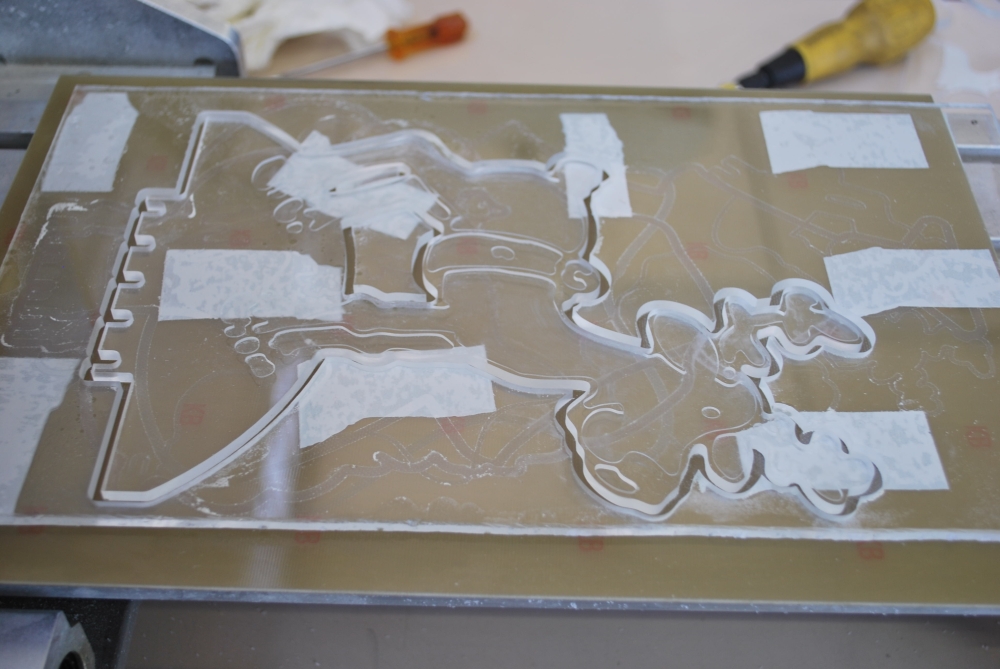
The designs were obtained working with the CNC some acrylic sheets.
But our CNC can do much more … Therefore we decided to make the greatest figure and design a new driver that mounts more LEDs.

Just because we do not like things simple we recreated all using a system based on Arduino.

This allows you to create an open source system easy to modify.
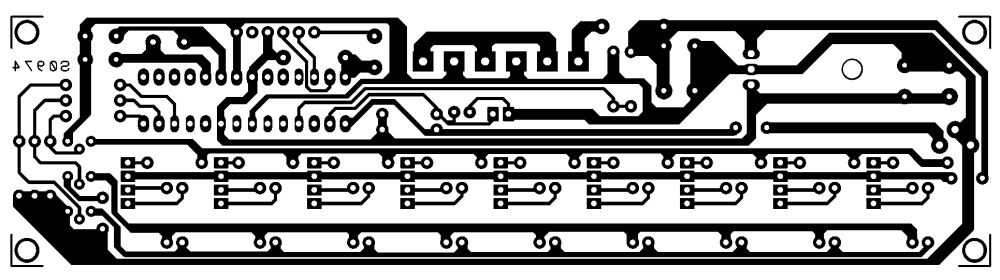
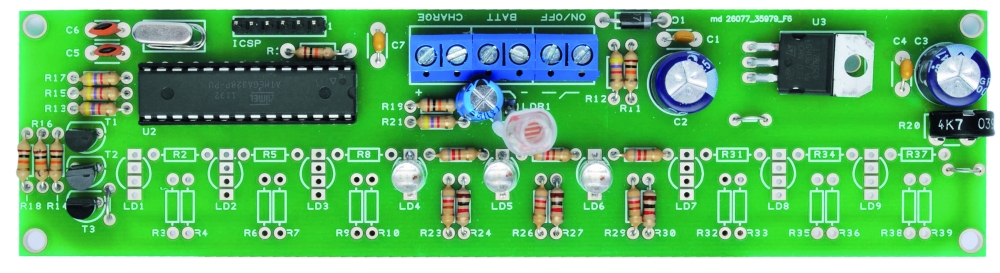
The microcontroller is an Atmega328 preprogrammed with the bootloader of Arduino UNO. The programming can be done via a USB / TTL (eg FTDI5V of SparkFun).
The circuit operation is very similar to that of the smallest model: here we find the photocell that allows to verify the amount of light present in the environment, but in this case, you can adjust the sensitivity of the circuit by a trimmer.

BOM

R1: 10 kohm
R2: 820 ohm
R3: 820 ohm
R4: 1 kohm
R5: 820 ohm
R6: 820 ohm
R7: 1 kohm
R8: 820 ohm
R9: 820 ohm
R10: 1 kohm
R11: 820 ohm
R12: 820 ohm
R13: 1 kohm
R14: 820 ohm
R15: 820 ohm
R16: 1 kohm
R17: 820 ohm
R18: 820 ohm
R19: 1 kohm
R20: 820 ohm
R21: 820 ohm
R22: 1 kohm
R23: 820 ohm
R24: 820 ohm
R25: 1 kohm
R26: 820 ohm
R27: 820 ohm
R28: 1 kohm
R29: 10 kohm
R30: 4,7 kohm
R31: 10 kohm
R32: 4,7 kohm
R33: 4,7 kohm
R34: 10 kohm
R35: 4,7 kohm
R36: 10 kohm
R37: 4,7 kohm
R38: 10 kohm
R39: Trimmer 4,7 kohm MV

C1: 100 nF
C2: 470 µF 25 VL
C3: 470 µF 25 VL
C4: 100 nF
C5: 15 pF
C6: 15 pF
C7: 100 nF
C8: 100 µF 25 VL

T1: BC547
T2: BC547
T3: BC547

LD1: LED 5 mm RGB c.a.
LD2: LED 5 mm RGB c.a.
LD3: LED 5 mm RGB c.a.
LD4: LED 5 mm RGB c.a.
LD5: LED 5 mm RGB c.a.
LD6: LED 5 mm RGB c.a.
LD7: LED 5 mm RGB c.a.
LD8: LED 5 mm RGB c.a.
LD9: LED 5 mm RGB c.a.

U1: 7805
U2: ATMEGA328P-PU (with bootloader)

Q1: 16 MHz

LDR1: photoresistor 2÷20 kohm

- Terminal 2 via (3 pz.)
- Socket 14+14
- Battery 12V/2A
- Strip male 6 via
- Plug
- Switch

Comparing the value read from the A/D converter connected to the photoresistor with that connected to trimmer R39, the micro decides whether to start the sequence of fading, or whether turn off the LEDs. RGB LEDs are driven by the transistor; this choice permit to control with a single line of microcontroller, more LEDs in order to create large luminous figures.

As you can see, we use a line dell’ATmega for each of the primary colors of red, green and blue, so it is clear that all the diodes will do the same play of light. Of course isn’t required to mount all the LEDs provided in the circuit: you mount those who need to obtain a good visual effect on the size of the pattern in the Plexiglass. Note that there are three terminals on the PCB: one to connect the power switch (ON / OFF) a second (BATT) to apply to the circuit power supply and a third (CHARGE) for a possible battery charger lead or a small 12-volt solar panel, which already incorporates the charging circuit. These solutions allow you to use the figures lack the power grid. In this regard, an analog input of the microcontroller is dedicated to control the battery voltage: when it drops below 10 V, the circuit will emit flashes to warn that the energy is about to end.

This circuit is evidently intended to be used externally (provided it is properly isolated) and will turn on and off independently, thanks to the ambient light sensor, which will illuminate the figures in the evening to let off in the morning. In short, is a solution to decorate the garden or backyard.

Building shapes
The materials chosen for this application are clear polycarbonate (or methacrylate) or Plexiglas, which can give the shape you want. Then we need to affect, deep enough (half or two thirds the thickness of the plate) the drawing or writing that you want to appear bright.

The Sketch

//****************************************************************
//*  Name    : RGB controller for common anode led               *
//*  Author  : Landoni Boris                                     *
//*  www.open-electronics.org                                    *
//*  blog.elettronicain.it                                       *
//*  www.futurashop.it                                           *
//****************************************************************

int red = 9;    // RED LED connected to PWM pin 3
int green = 10;    // GREEN LED connected to PWM pin 5
int blue = 11;    // BLUE LED connected to PWM pin 6
int photo = A4;    // BLUE LED connected to PWM pin 6
int trim = A5;    // BLUE LED connected to PWM pin 6
int volt = A2;    // BLUE LED connected to PWM pin 6
int r=50; int g=100; int b=150;
int rup; int gup; int bup;
int fader=1;
int inc=10;
void setup()
{
      Serial.begin(9600);
      Serial.println("Serial READY");
      rgb(r, g, b);
      r = random(0,255);
      g = random(0,255);
      b = random(0,255);

} 

void loop()  {

  Serial.print("trim  ");
  Serial.println(analogRead(trim)*2);  

  Serial.print("photo ");
  Serial.println(analogRead(photo)); 

  Serial.print("volt ");
  Serial.println(analogRead(volt));
  if (analogRead(volt)<600){
      Serial.println("low battery");
      rgb(0, 0, 0);
      delay(500);
      rgb(255, 255, 255);
  }

  if ((analogRead(trim)*2)>analogRead(photo)){
      Serial.println("trim > photo  -  off");
      rgb(0, 0, 0);
      fader=0;
  }
  else
  {
    if (fader==0){
      r = random(0,255);
      g = random(0,255);
      b = random(0,255);
    }
    fader=1;

  }
  //delay(2000);

  if (fader==1){
    funcfader();
  }
}

void funcfader(){
    Serial.println("fader");
    if (rup==1){r+=1;}
    else{r-=1;}
    if (r>=255){rup=0;}
    if (r<=0){rup=1;}

    if (gup==1){g+=1;}
    else{g-=1;}
    if (g>=255){gup=0;}
    if (g<=0){gup=1;}

    if (bup==1){b+=1;}
    else{b-=1;}
    if (b>=255){bup=0;}
    if (b<=0){bup=1;}

    delay(inc*2);
    rgb(r, g, b);
}

void rgb(int r, int g, int b)
{
  Serial.print("RGB: ");
  Serial.print(r);
  Serial.print(" ");
  Serial.print(g);
  Serial.print(" ");
  Serial.println(b);
  if (r>255) r=255;
  if (g>255) g=255;
  if (b>255) b=255;
  if (r<0) r=0;
  if (g<0) g=0;
  if (b<0) b=0;
  analogWrite(red, r);
  analogWrite(green, g);
  analogWrite(blue, b);
}


Star
Reindeer
Santa Claus
Tree

Beat Box table turns RFID tagging into beautiful music

RFID -- it's not just for creepy tracking anymore. Don't believe us? Check out this sweet table that turns RFID-tagged discs into music when dropped into one of four bowls. The discs are made from vinyl records, and each bowl has an RFID reader connected to an Arduino. Dropping a disc into a bowl triggers a drum, synth, guitar or bass loop. There's also an LED by each of the bowls to indicate which loop you'll be hearing. Video of the table in action, after the break.

Continue reading Beat Box table turns RFID tagging into beautiful music

Beat Box table turns RFID tagging into beautiful music originally appeared on Engadget on Wed, 14 Dec 2011 21:26:00 EST. Please see our terms for use of feeds.

Permalink | Email this | Comments
Engadget 15 Dec 02:26

Oscilloscope Christmas Tree

When I was a little kid, my dad worked at Bell Labs. Every year around Christmas, we’d go visit him at work. One memory which has always stuck with me from my holiday visits was seeing a Christmas tree on an oscilloscope. I was pretty amazed by it. Engineers are a funny bunch — they tend to celebrate holidays in the most uniquely nerdy and wonderful ways, just like kids. When I recently acquired a new ‘scope and wanted to familiarize myself with it, I knew exactly what my test circuit was going to be.

In honor of the nameless BTL engineer whose scope scribbling captivated me as a child, here we are. Maybe the same thing will happen for some other kid. There are a lot of holiday parties coming up. You could put this on one of your scopes at work or at your hackerspace, and some other kid will see it, and it’ll fire their imagination too. It looks pretty neat at any rate, and it’s downright fascinating after a few fortified egg nogs.

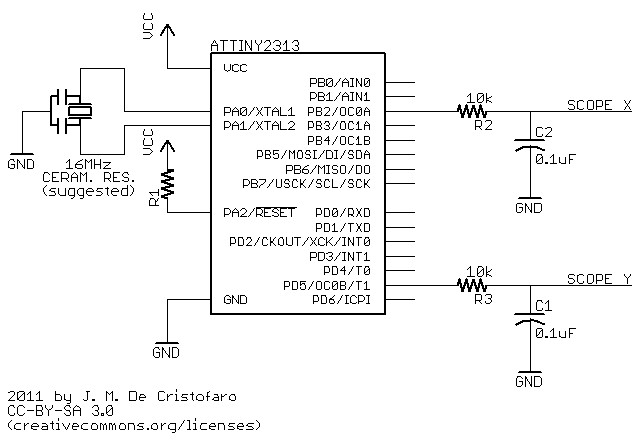
While I suspect the original was built with 74xx logic circuits, or maybe a couple 555′s (you could easily make a Christmas tree shape by combining triangle (x) and sawtooth (y) waveforms), this one uses an AVR ATTiny2313. (I used my handy BB313 board). You could do this with an Arduino too (that is covered below) — pretty much anything that has an 8-bit timer with dual PWM outputs will do the job. The discussion will apply regardless of the implementation (though the numbers might change).

Before you continue, bear in mind that I assume you already know how to use an oscilloscope: how to attach the probes, adjust the voltage ranges, put it in XY mode, etc.

The ATTiny code is here, and this is the schematic for the circuit:

How it works:

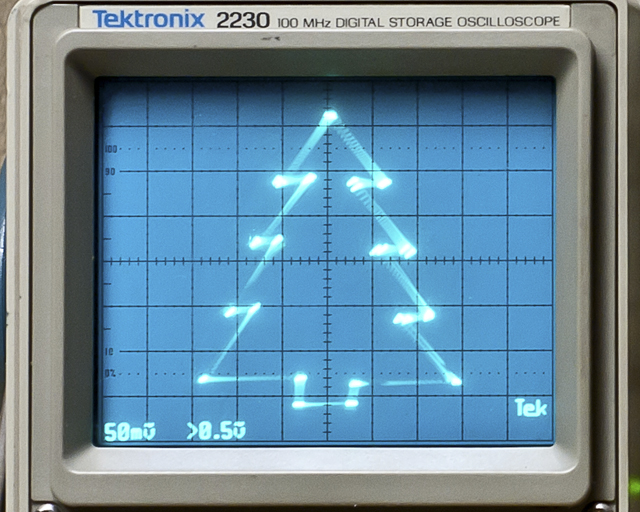
The PWM outputs feed two RC low-pass filter circuits, with a time constant chosen to effectively suppress the jitter from the rectangular waveforms. The PWM outputs (and hence the DC components of the signals) jump from one point in the drawing to the next; in order to actually draw lines to make the tree shape, you have to interpolate between those points. The delay between one ‘drawing’ point and the next has to be chosen to allow the charge/discharge curve of the RC circuit to do the interpolation. You’ll notice in the photo above that the ‘straight’ lines are slightly curved. This is the because the jumps in x don’t quite equal the jumps in y. You’ll also notice that the tree appears a bit crooked. This is the result of the RC curve not settling out completely before the next transition — the voltages never quite get to where they’re supposed to go before they switch to a new value. Personally, I rather like these imperfections — the tree has a hand-drawn quality to it, like a homemade ornament. You could make the lines straighter and the drawing more uniform by using a longer delay, but it will lower the overall refresh rate, resulting in noticeable flicker. How you draw your oscilloscope Christmas tree says a lot about your personality.

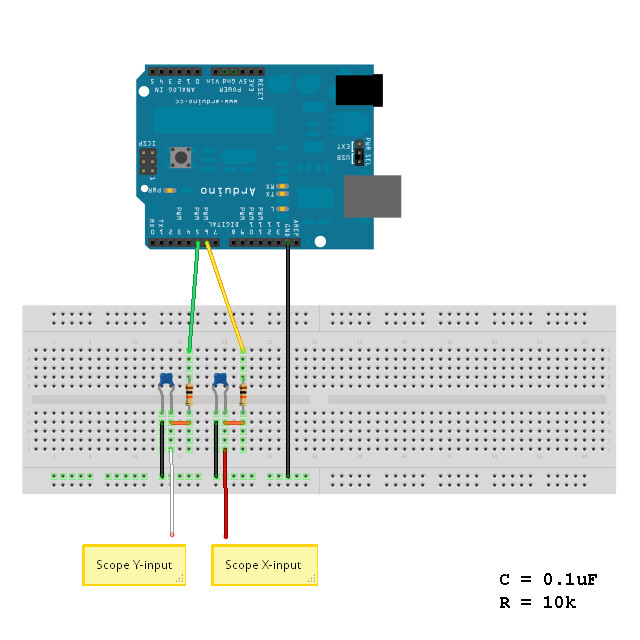
The ATTiny’s clock is running off of a ceramic resonator at 16MHz. The PWM frequency is 16MHz/256 or 62.5kHz. The corner frequency of the filter is 160Hz, which is about 8.5 octaves (2.5 decades) below that. I used 10k resistors and 0.1uF caps here — you could also use any other “equivalent” RC combo (100k/0.01uF or 1k/1uF, etc.) If you choose to use a chip with a different clock frequency, then you’ll have to adjust the RC circuit accordingly.

Reducing the capacitor values (or increasing the resistor values) will shift the corner frequency of the filter up, and you’ll start to see the lines get crooked, like resistors in a schematic. These are triangle waves resulting from filtering the rectangular PWM signal. This can look pretty cool too, actually, as below where I switched to 0.022uF capacitors.

Now the tree has needles, and all it took was changing the coefficients of a partial differential equation — easy! (this might be a great way to introduce a kid to the concept of filtering — just sayin’).

Arduino Implementation:

Doing this on an Arduino isn’t much different than using the ATTiny, except that it’s more expensive and instead of a real schematic, you have to read this ridiculous handy cartoon (above).*

The Arduino code is here. It uses no libraries, so all you have to do is extract the folder into your Arduino directory, set up your oscilloscope and load the sketch.

Possible alternative methods:

  • If you really, really want a perfect, orthogonal tree, you can use an R2R ladder or dedicated DAC/soundcard to generate the control voltages.
  • You can get straighter lines if you use a current mirror to feed the RC circuit, thus making it a “true” integrator with a straight-line slope.
  • If you want to increase the refresh rate, you could set an upper limit on the 8-bit timer to a lower value, say 64, and set all your points therein. Note on the ATTiny you’ll probably have to do this using an interrupt from the other timer, but it would give you faster PWM output, which means you can use a smaller filter time constant and thus a higher refresh rate.
  • …or, you could overclock the AVR (you know you’ve always wanted to).
  • As I mentioned in the beginning, you might be able to do something like this with a couple of 555′s generating triangle and sawtooth waveforms. If you get their phases matched correctly and with the right frequency ratio, you could have a pretty nice looking tree!

Be as creative as you like with it — I hope you enjoy making it work for you.

Merry Christmas!

*just kidding — I love Arduino! Buon Natale!


UPDATE – Several folks have done this themselves and written in:

EmbeddedEric did an awesome Frosty the Snowman with his daughters.

aussie_nick did one using a DSO.

Goran did one for the Calgary On-Air Engineers.

Gordon Pearce took it to the next level with animation using sine functions:

Nice!