Posts with «arduino» label

DIY Star Trek Automatic Door

Who hasn’t dreamed of have a Star Trek style automatic door in their home (complete with “wooshing” noise)? Now you can build your own with the help of this DIY project and some pneumatics. The pnematic system uses an air compressor, a piston, valves, hoses, infrared sensors, and an Arduino.  The best part about the pneumatics is that the “woosh” noise comes built in – No special effects department needed!  Check out more details about the door.

Popular Star Trek Projects:

Roll up, roll up for the magical mystery Arduino tour

If this news isn't as obvious as John Obvious: Professor of Obvious studies at Cambridge University: we love Arduino 'round these parts. Phil and Limor of Adafruit Industries took a tour of the Italian foundry's Turin factory and took a gallery of pics (and video!) on the way. It's a great insight into how the building process works for the modding tool, and you can head on down to our source link to check out the gallery in full -- we've also included a direct link to the video as the guys walk down the production line in our more coverage link. We're so good to you, you know.

Roll up, roll up for the magical mystery Arduino tour originally appeared on Engadget on Fri, 13 Jan 2012 08:44:00 EST. Please see our terms for use of feeds.

Permalink | Email this | Comments
Engadget 13 Jan 13:44

DIY Capacitive Touch Made Easy

Capacitive touch allows electronics to sense when your finger is within a few millimeters of a surface to simulate a button “press” without the use of an actual mechanical button.  You’ll notice the feature on the new Xbox 360 Slim.  Here’s a simple way to make your own CapTouch surfaces.   All it takes is some inexpensive copper tape, a few resistors, and a microcontroller.

The Arduino CapSense library regulates the timing of the readings so all the hard work is done for you. Readings will vary based upon how the metal is touched (finger tip or full finger pad).  View the full project details.

Top TouchScreen Projects

Psychedelic Sphere of LEDs

The friend of a performer created this optical light display of 256 LEDs that can be programmed to create some fascinating displays.  The ball has 16 panels, which are not only the circuit boards, but the structural support of the ball as well. The central brain is provided by an Arduino powered by two AA batteries.  For more information, see the full project details (the site may be temporarily down).

Popular LED Projects:

Hack n Mod 07 Jan 16:31

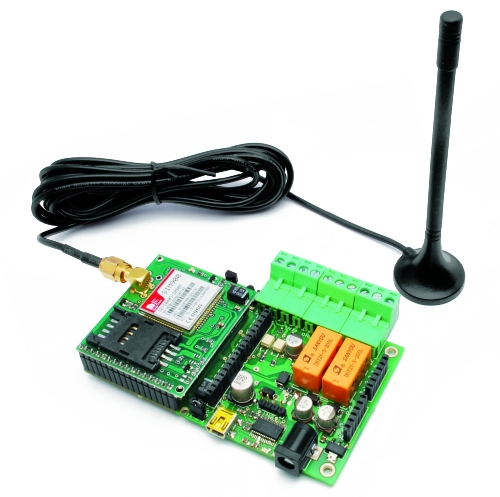
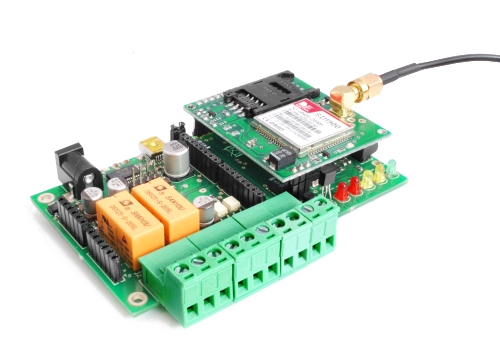
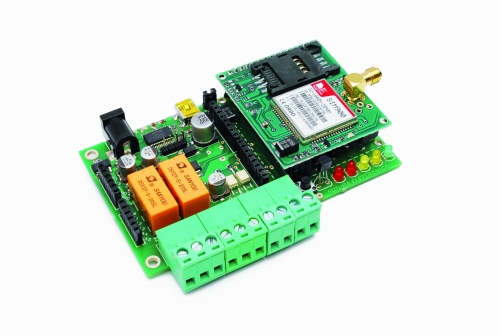
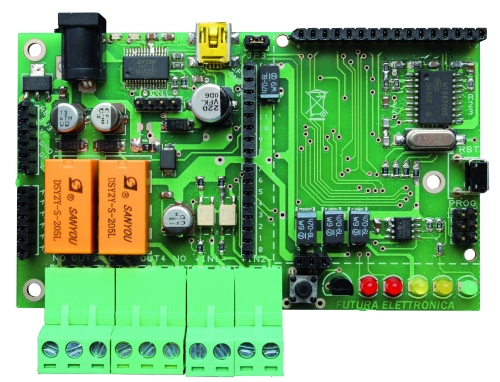
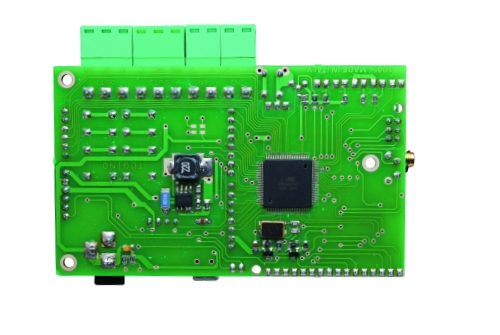
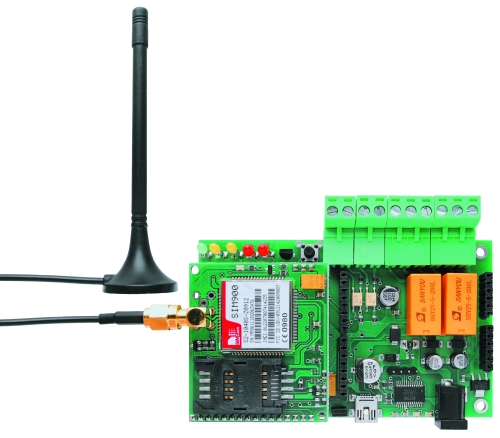
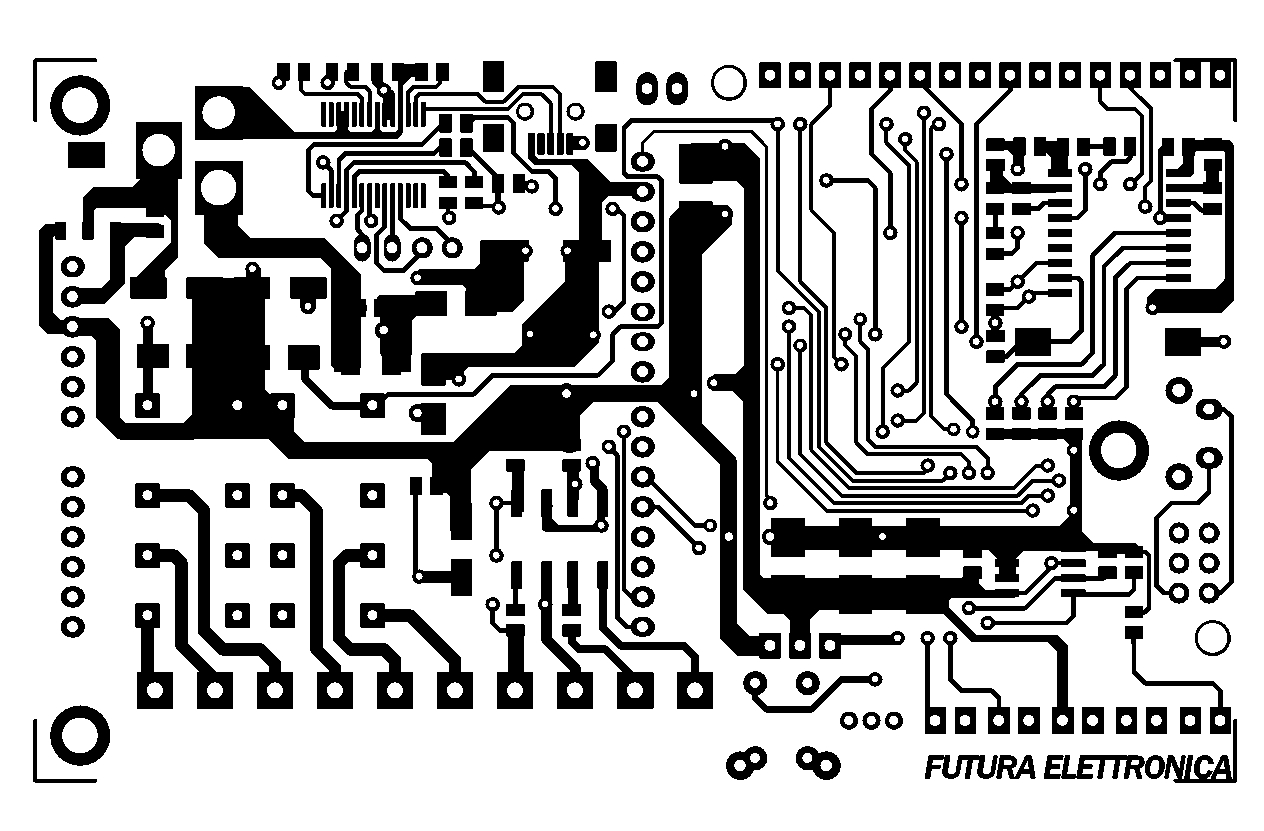
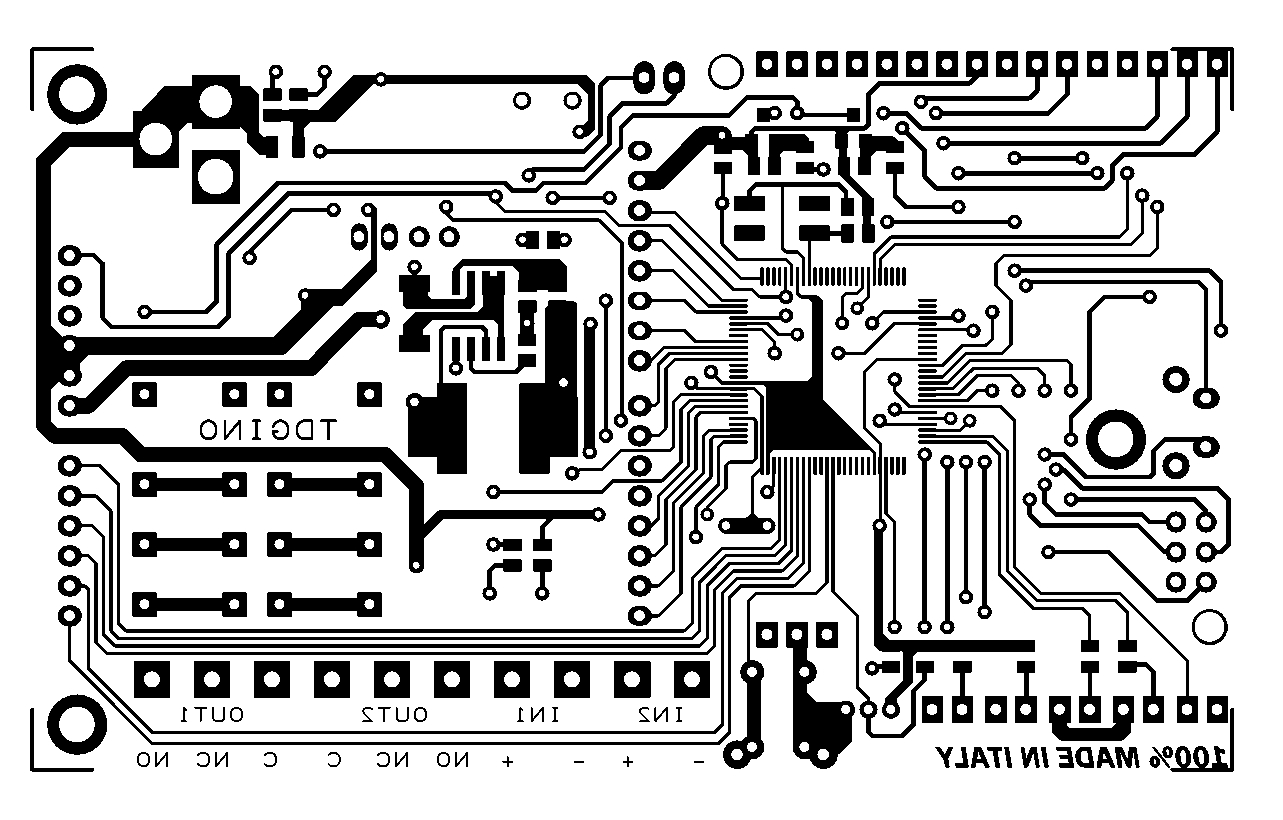
TiDiGino, the Arduino-based GSM remote control


Using an ATmega 2560 and therefore the heart of Arduino, we have developed a universal remote control with GSM. This allows  to control 2IN/2OUT, DTMF key, gate control and GSM thermostat activated remotely.

We have already presented several remote control with different functions.
But now we want to present the best remote control ever made with Arduino.
The remote control is easier, thanks to the availability of several libraries that allow you to do anything to the Arduino microprocessor; if there is not really a specific library, you can modify an existing one. Thus was born TiDiGino, based on the chip ATmega 2560 used in Arduino Mega. Our system has connectors S.I.L. to mount any shield, each of them is in the same location where you would be in the original development platform, which enables the use of commercial and in any case the standard shield.
We said that the functions of our remote control, ie 2IN/2OUT, gate opener, key DTMF GSM and thermostat can be achieved by using special firmware, well, we could write these ourselves, but we wanted to offer our readers who know the Arduino environment do them. This is the sense of TiDiGino Contest, which you could follow our blog and that has just ended, as promised, we publish the hardware of the remote control and a few routines.

The circuit

The TiDiGino is based on a ATmega 2560 chip, some pins are used to manage GSM functionality, corresponding to ports that are not used in the original Arduino MEGA. For this reason it is necessary to replace the file pins_arduino.c located under the folder C:\ProgramFiles\arduino-0022\hardware\arduino\cores\arduino that is created by downloading the Arduino IDE, with that we made available with the library, otherwise it is possible to manage all’ATmega 2560 lines of I/O provided by the platform Arduino MEGA.

This choice was intended to leave some I/O free for use by any shield. Therefore you can use the sketches already made to control a specific shield with the original Arduino board, even on TiDiGino.
In compliance with the open-source philosophy we have made available on our site libraries to operate the main blocks of the TiDiGino.
To test the circuit we made four sketches, each of which allows you to use a section of the system. The sketches are all contained in the file GSM_TDGINO.zip, downloadable from the development page of Google, which contains the library that allows you to manage the GSM of TDGINO.
This library comes from the one developed by HWKitchen, but has been adapted to our hardware, as, for example, use the second serial dell’ATMEGA2560 to manage the GSM module of Simcom SIM900. Decompressing the zip in the folder of the Arduino libraries (eg C:\ProgramFiles\arduino-0022\libraries) the library is immediately usable.
By copying the library, are also automatically installed the examples we have developed to manage the various sections, in order to test these examples must be connected to the USB port TDGINO and provide an external power supply circuit of about 12 VDC (1 A of current).
This creates a virtual COM will be used to program the remote control. Select the Board “Arduino Mega 2560″ and from File-> Examples-> GSM_TDGINO, choose the example that you want to upload to the remote control.


The hardware

The I/O used for the expansions are PB4÷PB7, PE3÷PE5, PG5, PH3÷PH6, then there are PE0 and PE1 that are, respectively, RXD and TXD of the first internal UART to the microcontroller.
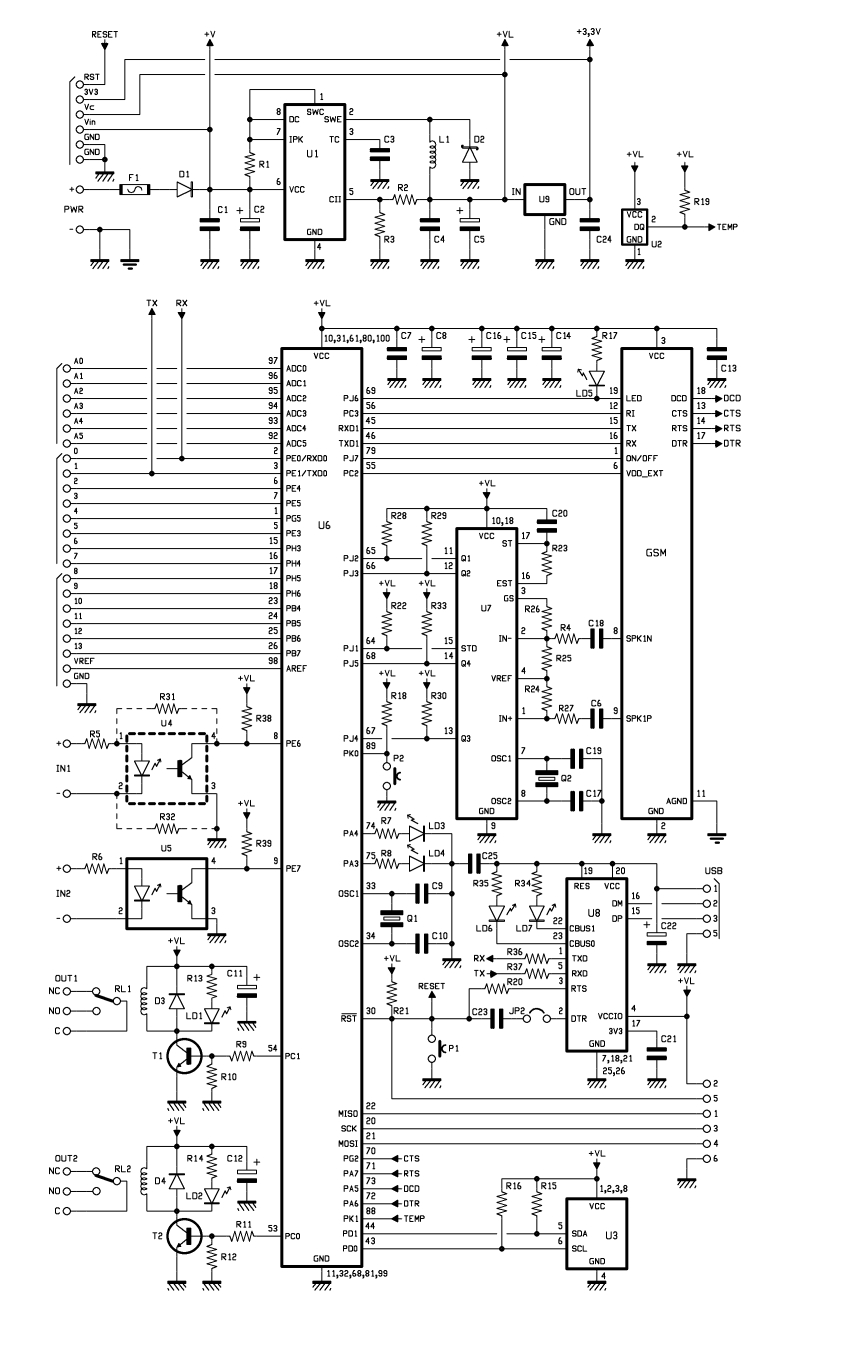
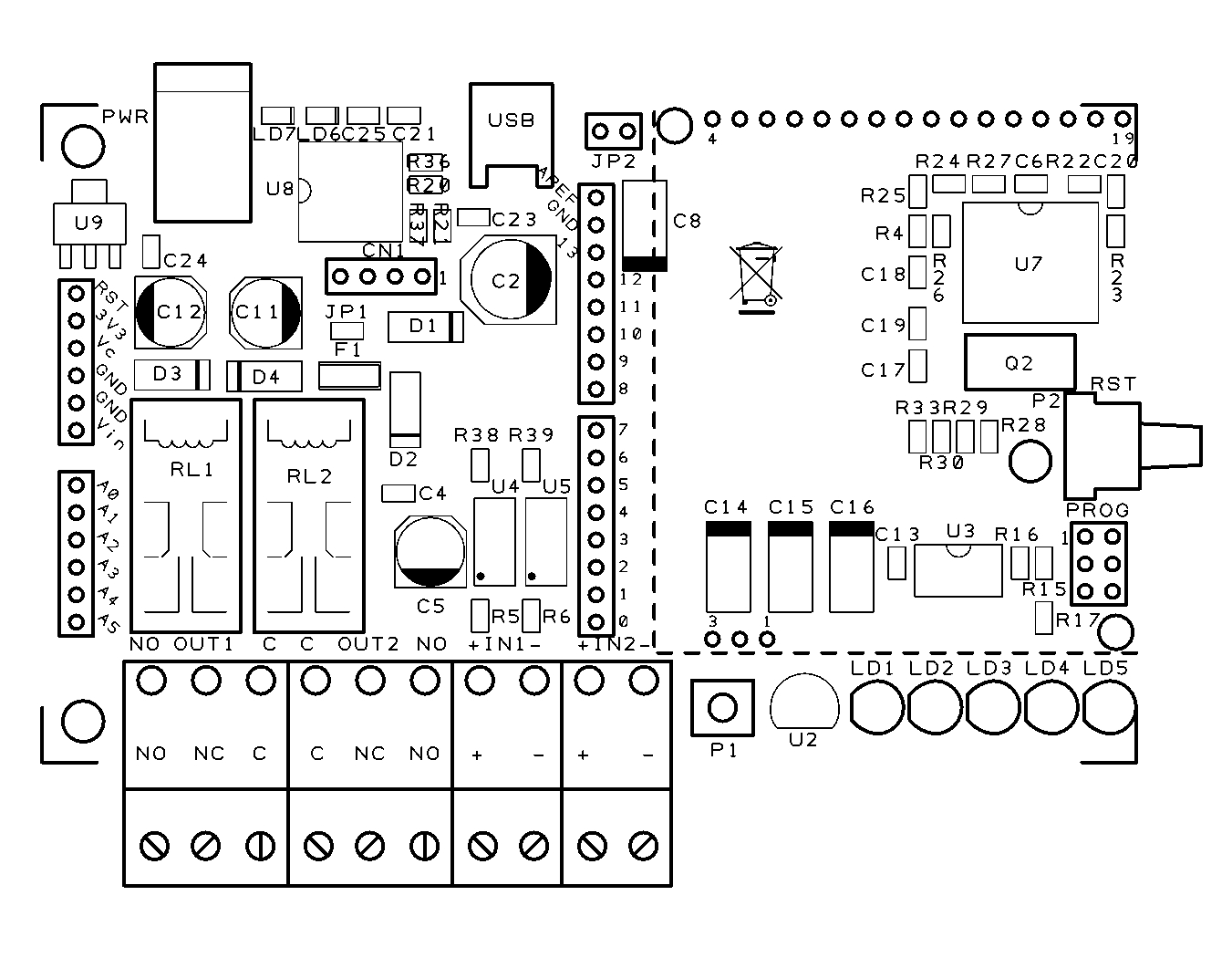
Now we see the lines of I/O used to manage the devices necessary to implement the functions of remote control, starting from PE6 and PE7 configured as input (pull-up R38 and R39) used to read the status of the optically isolated inputs, each of which detects the presence of a dc voltage (from a minimum of 3 to a maximum of about 35 volts) and AC (from a minimum of 2.5 to a maximum of 30 Vrms) applied to IN1 (circuit U4) and IN2 (circuit U5).
The command of the relay output is obtained with PC0 and PC1, initialized as outputs, each relay is controlled by an NPN transistor.
The GSM in the circuit diagram is not the GSM module, but a circuit (TDGGSM_900 - Store) that mounts it.
There is also a EEPROM memory 24FC256-SN to store user data.
For the management of the temperature sensor, used for the feature “Thermostat GSM”, the ATmega use the pin PK1 initialized as two-way line, the remote temperature sensor used in the Dallas DS1820 is capable of measuring temperatures in the range -5 to 150 ° C with an accuracy of ± 0.5 ° C (-10 to 85 ° C).
The DTMF section use the U7 (a MT8870, SMD): capable to decode standards tone thanks to a complex pattern of active filters agreed by the clock signal generated from its oscillator.
The USB interface circuit uses the integrated U8: the classic FT232RL. The pins 3 (TX) and 2 (RX) correspond to the first UART, since they are essentially used to program TiDiGino thanks the bootloader.
P1 is the button to reset the circuit, which also DTR is forced, by the computer when we want to load the firmware in the micro, exploiting the bootloader.
Well, we conclude the analysis with the power, which is a DC voltage, even non-stabilized (applied to the points + and – PWR) in value between 7 and 32 V, this voltage is filtered downstream of the protection diode reverse polarity (D1) by the capacitors C1 and C2, the fuse F1 allows us to protect the circuit and the source of power in an integrated circuit in the controller below and that we need to derive the 4 volts required to make run the rest of the circuit.

BOM

R1: 0,1 ohm 1W (1206)
R2: 2,2 kohm (0805)
R3: 1 kohm (0805)
R4: 100 kohm (0805)
R5: 4,7 kohm (0805)
R6: 4,7 kohm (0805)
R7: 330 ohm (0805)
R8: 330 ohm (0805)
R9: 4,7 kohm (0805)
R10: 10 kohm (0805)
R11: 4,7 kohm (0805)
R12: 10 kohm (0805)
R13: 330 ohm (0805)
R14: 330 ohm (0805)
R15: 1,5 kohm (0805)
R16: 1,5 kohm (0805)
R17: 330 ohm (0805)
R18: 4,7 kohm (0805)
R19: 4,7 kohm (0805)
R20: 100 ohm (0805)
R21: 4,7 kohm (0805)
R22: 4,7 kohm (0805)
R23: 330 kohm (0805)
R24: 39 kohm (0805)
R25: 56 kohm (0805)
R26: 100 kohm (0805)
R27: 100 kohm (0805)
R28: 4,7 kohm (0805)
R29: 4,7 kohm (0805)
R30: 4,7 kohm (0805)
R31: 0 ohm (0805) *
R32: 0 ohm (0805) *
R33: 4,7 kohm (0805)
R34: 470 ohm (0805)
R35: 470 ohm (0805)
R36: 10 ohm (0805)
R37: 10 ohm (0805)
R38: 4,7 kohm (0805)
R39: 4,7 kohm (0805)

C1: 100 nF (0805)
C2: 220 µF 35 VL (F)
C3: 100 pF (0805)
C4: 100 nF (0805)
C5: 100 µF 16 VL (D)
C6: 100 nF (0805)
C7: 100 nF (0805)
C8: 470 µF 6,3 VL (D)
C9: 22 pF (0805)
C10: 22 pF (0805)
C11: 47 µF 16 VL (D)
C12: 47 µF 16 VL (D)
C13: 100 nF (0805)
C14: 470 µF 6,3 VL (D)
C15: 470 µF 6,3 VL (D)
C16: 470 µF 6,3 VL (D)
C17: 10 pF (0805)
C18: 100 nF (0805)
C19: 10 pF (0805)
C20: 100 nF (0805)
C21: 100 nF (0805)
C22: 4,7 µF 6,3 VL  (R)
C23: 100 nF (0805)
C24: 100 nF (0805)
C25: 100 nF (0805)

Q1: Quartz 16 MHz (C7S)
Q2: Quartz 3,579545 MHz (HC49/4H SMX)

U1: MC34063AD
U2: DS18B20+
U3: 24FC256-SN
U4: TLP181
U5: TLP181
U6: ATMEGA2560-16AU
U7: MT88L70AS
U8: FT232RL
U9: TC1262-3.3 (SOT-223)
GSM: TDGGSM_900

D1: GF1M-E3
D2: MBRS140TRPBF
D3: GF1M-E3
D4: GF1M-E3

T1: BC817
T2: BC817

LD1: LED 3 mm red
LD2: LED 3 mm red
LD3: LED 3 mm yellow
LD4: LED 3 mm yellow
LD5: LED 3 mm green
LD6: LED yellow(0805)
LD7: LED red (0805)

L1: coil 22 µH

RL1: relay 5V 2 vias
RL2: relay 5V 2 vias

P1: Microswitch
P2: Microswitch 90°

F1: Fuse 2 A (1206)

- screw 2 vias(2 pz.)
- screw 3 vias (2 pz.)
- Mini-USB
- Plug
- Jumper
- Strip male 2 poli
- Strip male 3 poli (2 pz.)
- Strip male 4 poli
- Strip female 3 poli
- Strip female 6 poli (2 pz.)
- Strip female 8 poli (2 pz.)
- Strip female 16 poli
- PCB

Functions

There are several sketches to handle the remote control, all came through TiDiGino contest.
These files can be downloaded from Google, where you will find the library and files created by various readers.
Basically all the sketches perform the same functions.
Summarize here the common features.

The remote can be operated by commands sent by SMS, but you can also control it via the serial port (connected to USB converter).
Each command is followed by a response (via SMS) directly to the sender, but the answer may be disabled. In addition there is an alarm function, as the automatic sending of SMS or voice calls, based on conditions on each of the two inputs.
The circuit can also be used as a gate control, calling the SIM in the TiDiGino: the system recognize the calling number and if this number is stored the relay will switch on. In the DTMF mode, the remote control can be controlled by a multi-frequency telephone tone.
In addition, the circuit can operate as a thermostat, running an air conditioning system.

In summary, there are the following features:

• Remote alarm
• Gate control
• GSM termostat
• Remote control with DTMF

Library and sketch

Download the latest sketch for this GSM remote control.

Design


Luminch One: an Arduino lamp you control with the wave of a hand (video)

A DIY lamp may not sound like the most thrilling project on Earth, but the Luminch One is special. Not only does this hand-made light from Francisco Castro provide illumination -- the most important function of any lamp -- but it does so while looking beautiful and providing a level of interactivity missing from most household lighting solutions. Underneath the pixelated-looking paper shade is an LED bulb controlled by an Arduino hooked up to an IR sensor. Simply wave your hand over the top to turn it on and off. You can also control the brightness by holding your hand above the stylized beacon momentarily to engage the dimmer, then moving your hand up and down to set your preferred lumen level. Check out the video after the break and head on over to the source for complete build instructions.

Continue reading Luminch One: an Arduino lamp you control with the wave of a hand (video)

Luminch One: an Arduino lamp you control with the wave of a hand (video) originally appeared on Engadget on Tue, 03 Jan 2012 14:44:00 EST. Please see our terms for use of feeds.

Permalink | Email this | Comments

Speed of sound lab writeup

The speed-of-sound lab we did on 30 Dec 2011 went pretty well after all.

Coil (about 0.5H) with refrigerator magnet on top. Magnet is stuck to the core of the coil just by its own magnetism.

I used a setup inspired by the one in the Chapter 4 Lecture 3 video at http://courses.ncsu.edu/py581/common/podcasts/.  That is, a long metal bar tapped with a metal striker at one end.  A clock is started when the tap is made (a simple electrical connection), and stopped when the wave is detected at the other end.  As mentioned in my earlier post More on the slinky and the speed of sound, I used an electromagnet and a small refrigerator magnet to detect the sound wave.  The coil has a  68.3 Ω resistance and a laminated iron or steel core, and I estimated the inductance at about 0.5 Henry (the estimate  may easily be off by a factor of 2—I should measure it better some day when it matters). When I rested a piece of aluminum bar stock on the magnet and tapped the other end, I got a signal of about 0.3 v, which I could see clearly on my oscilloscope.  (Note: the analog view of the signal was not done in the lab with the students, because we were pressed for time and moving the analog oscilloscope out to the room worked in and setting it up would have taken too long.)

The signal is not large enough to be measured by a digital input on the Arduino that we used for timing, and the Arduino analog-to-digital converter (accessed with analogRead()) is a very slow one, that would limit our time resolution to about 100 µsec, rather than 4 µsec as we can get with the “micros()” function call. I happened to have an LM311 comparator chip from about 30 years ago, so I made a comparator circuit to convert the analog signal to a clean digital signal.

Comparator circuit used to convert the small electrical signal induced in the coil to digital levels for input to the Arduino. The pair of 15kΩ resistors serve as a voltage divider to set the bias voltage for the inputs to about 2.5 volts, in the middle of the range. The output pull-up resistor provides a load for the comparator. The two capacitors filter out high frequency signals picked up by the coil—they were not part of the circuit provided in the LM311 datasheet, but turned out to be essential.

I did have to modify the circuit a little from the one for a magnetic pickup given in the data sheet, as the output remained high with that circuit.  Adding small capacitors to the input and output seemed to fix things.  I arbitrarily used 47000pF capacitors, because I happened to have several of them, but I also experimented with some other sizes (560 000 pF and 1000pF) which did not work.  One effect of the capacitor on the input is to make a resonant circuit that rings with a period of about 800 µsec (eyeballed from the oscilloscope trace), which would make the inductance of the coil about 0.34H.  This ringing has a couple of consequences: 1) if the magnet is the wrong way around, the polarity of the impulse is reversed and the comparator will detect the impulse half a cycle later, adding about 400 µsec to the reading, and 2) the signal ramps up slowly in response to an impulse, and the delay in the comparator circuit is dependent on the magnitude of the input signal.  This will add noise to the timing measurements.

Because the magnet we used had residues of paper and glue on one side, it was easy to check that it was oriented correctly.  For one set of measurements, the coil and magnet had to be moved, and the magnet may have been upside down for that set of measurements, resulting in a different offset for those measurements.

To keep the noise from differences in amplitude to a minimum, we took several measurements (generally 10 or 20) of each time, discarding obviously bogus numbers (like 8 µsec when the comparator had already detected something before the strike, or > 10 msec, when an impulse had been missed).

On the Arduino, the following program was used measure times.  Pin 2 of the Arduino was connected with a long wire to a metal striker, with the object being struck connected to Arduino’s GND with another wire.  Contact between the two metal objects pulled pin 2 down (overpowering the 20kΩ pull-up in the Arduino), recording the time in start_1. As soon as the comparator detects the sound, pin 3 is pulled down, and the time is recorded on stop_1.  The resolution of the timer is about 4 µsec, but the repeatability of the times varied more, depending in part on how consistently the strikes were made (one of us appeared to have much more consistent technique than the others, and the times from his strikes had lower spread—we did not record who did the strikes on our data log, and so we can’t quantify this observation).

void setup()
{
  //  put a 20k pullup resistor on pin 3 (sound detector)
  pinMode(3,INPUT);
  digitalWrite(3, HIGH);
  //  put a 20k pullup resistor on pin 2 (striker)
  pinMode(2,INPUT);
  digitalWrite(2, HIGH);

  Serial.begin(115200);
}

void loop()
{
  Serial.println("Ready");

  // wait for pin 2 to go low (contact with striker)
  while (digitalRead(2)>0) {}
  long start_1=micros();

  // wait for pin 3 to go low (sound detected)
  while (digitalRead(3)>0){}
  long stop_1=micros();
  long diff = stop_1-start_1;
  if (diff > 10000)
  {   Serial.print(F("rejecting large delay: "));
  }
  Serial.print(diff);
  Serial.println(F(" microseconds"));
  delay(200);  // wait 200 msec

  // wait some more if the striker still in contact
  while (digitalRead(2)==0) {}

}

The vertical rod is the one being measured. The sensor is on the floor and the rod is struck at the top end. The breadboard has the comparator circuit connected to the Arduino, which in turn is connected to a laptop (not in the photo).

The setup for most measurements was simple: the coil was put on the floor with the magnet resting on top. A rod was held vertically on top of the magnet and struck at the far end with another rod. Initially, we used a small screwdriver as the striker, but this turned out to be hard to hold, and so we switched to using a foot-long piece of ¼” steel rod, which was also used for some of the timing tests.

Because the delay in the comparator is unknown, but likely to be substantial compared to the time of flight, we tried to measure the same material at different lengths, and do a straight-line fit of the data to estimate the offset. By doing many measurements at each length, we could average out a lot of the noise. We could also see how well the data fitted a model that assumed that the time delay for the sound arriving would be proportional to length—that is, does the speed-of-sound model make sense for this data?

The simplest set of data was for 3 rods ¼” in diameter, made of hot-rolled weldable steel (that’s all the information about the material that the hardware store had on the tag). I’ve put the data in a page on the blog: Steel rod speed of sound lab data.

We also measured one aluminum bar (Aluminum bar speed of sound lab data), one long copper tube (Copper tube speed of sound lab data), and two wood dowels (Wood speed of sound lab data).  Because wood is not conductive, we added a washer on the striking end of the dowel, to provide a conductive contact. The copper tube was about 3m (10′) long and very soft, so we laid it on the floor and duct-taped the sensor to one end.

Perhaps the most interesting data set comes from an aluminum ladder (Aluminum ladder speed of sound lab data).  We removed one foot from the ladder and duct-taped and bungey-corded the sensor to the bottom of the ladder.  We then struck the ladder inside the hollow rungs, providing a nicely spaced series of different ten different lengths.  Because of the difficulty in getting the duct tape to stick to the ladder, the magnet fell off and was replaced a few times in setting up the sensor.  The final orientation was not checked, but I believe that it was backwards, so that the delays of the sensor were substantially larger for the ladder than for the other measurements.  Luckily, there are enough different lengths that we can get a very good linear fit even with a large offset.

I did a fit for the steel-rod data using the following gnuplot script:

unset key

set title "Time of flight for compression wave in 1/4\" hot-rolled steel rod"
set xlabel "length (meters)"
set ylabel "time (seconds)"

set xrange [0:*]
set yrange [0:*]

fit a*x+c 'steel-rod.txt' using (0.01*$1):(1e-6*$2) via a,c

print "velocity=", 1/a, "m/s"

plot a*x+c, 'steel-rod.txt' using (0.01*($1+2*rand(0))):(1e-6*$2)

which produced an estimate of 5292 m/s for the speed of sound in the steel rod. I was noticing on the web that the speed of sound in thin rods may be a bit different from the speed of a planar wave in bulk steel, so I’m not sure what the “right” value is for this measurement, but it sure seems reasonably close to reported values around 5000–6000 m/s.  I also get from the same fit an estimate of the delay in the sensor and comparator of 33.7 µsec, which I can use for the aluminum bar and copper tube data. How does the fit look?  See for yourself:

The linear model seems like a pretty good fit for the data on the steel rod, but the scatter on the data is a little high. Note: small random jitter was added to the x values, in order to spread the points out.

If I remove outliers (the two largest and two smallest measurements from each length), I get a tighter fit (naturally), but one with is also likely to be more accurate, as outliers have a large influence in linear regression:

After eliminating the outliers, the estimated speed of sound is 5267 m/s and the sensor delay is 31 µsec.

Using a similar script, but with a fixed 31 µsec offset, for the aluminum bar data and the copper tube data (again eliminating the two largest and two smallest measurements), we get 4412 m/sec for the aluminum bar and 3857 m/s for the copper tube. (Of course, we don’t have anywhere near 4 significant figures, so I should probably round these to 4400 m/s for aluminum and 3900 m/s for copper.)

The ladder data used essentially the same script as the steel-rod, but even after censoring the data had a pretty wide spread:

The ladder data, after removing the two largest and two smallest times at each data point, got an estimated speed of sound in aluminum of 3955 m/s. The offset was 256.6 µsec, confirming that the magnet had been reversed. (It also implies that one period of the ringing is about 450 µsec, which is shorter than the period I thought I saw on the oscilloscope.)

If I fit the data from the wood dowel using the 31 µsec offset, the line does not fit the data at all well. If I fit with a 2-parameter model, I get an offset of 162.6 µsec (between the ones for the steel rod data and the ladder data), and a velocity of 6150 m/s, which is unusually high for wood. It is a very light wood, so perhaps the number is reasonable, but I’d be more comfortable if we had had more different lengths to test. The difference in the delay introduced by the sensor suggests to me that I should have used multiple lengths for each of the materials, despite the inconvenience (I only had one piece of aluminum bar and did not want to cut it—similarly, I did not want to cut the copper tube.)

Comparing our speeds with typical speeds from engineeringtoolbox.com:

Material our speed
m/s
typical speed
m/s
steel rod 5292 6100
copper tube 3857 3901
aluminum bar 4412 6240
aluminum ladder 3995 6240
wood 6150 3300–3600

The best match is for the copper, with our aluminum alloys having a much lower speed of sound than typical for pure aluminum (does our alloy have higher mass? lower stiffness?), and our wood dowel having a much higher speed of sound than typical for wood. The steel rod was a little low, but within the range of reported speeds of sound in steel.

This report took me several hours to write, in part because producing the graphics took a while, and in part because I fussed around a lot with seeing if removing outliers from the data helped get better results.  My son produced a substantially similar lab report, with graphs but no pictures or schematic of the comparator, in 2–3 hours.  He did not play with removing outliers.  He also correctly reported the velocities with only 2 significant figures (in cm/µsec).


Tagged: AP physics, Arduino, comparator, high school, physics, speed of sound

Insert Coin: A look back at ten top projects from 2011

2011 has been a tremendous year for tech -- Amazon launched a $200 Android tablet, AT&T and Verizon continued their LTE expansion, Apple killed off the Mac mini's SuperDrive and Samsung introduced a well-received killer 5.3-inch smartphone. But tiny tech startups made their mark as well, proving that you don't need an enormous R&D budget to spur innovation. Still, development isn't free, and unless your social circle includes eager investors, seed money has been traditionally hard to come by.

For many of this year's indie devs, crowdfunding sites have been the answer, with Kickstarter leading the pack. We've seen an enormous variety of projects -- including a deluge of duds and plenty more semi-redundant iPhone accessories -- but a few treasures soared above the swill to be featured in our Insert Coin series, with many of those meeting their funding goals and even making their way into the hands of consumers. Now, as 2011 draws to a close, we've gone through this past year's projects to single out our top ten, and they're waiting for your consideration just past the break.

Continue reading Insert Coin: A look back at ten top projects from 2011

Insert Coin: A look back at ten top projects from 2011 originally appeared on Engadget on Sat, 31 Dec 2011 16:00:00 EST. Please see our terms for use of feeds.

Permalink | Email this | Comments

OpenPCR a $600 PCR Machine

One of our grad students just pointed me to the OpenPCR project at OpenPCR – the $599 Thermal Cycler / PCR Machine.

The machine is a thermal cycler that is controlled via a USB cable from a computer (PC or Mac, probably Linux as well, if you can figure out how to modify the code to talk to the USB port on your version of Linux).  It comes as a kit that you assemble yourself (from laser-cut wooden parts, which are probably not very sturdy, but give a nice homebrew feel to the machine.  You’d have to add some brass gears if you want a steampunk look.

Since commercial PCR machines are in the $3000 range, a $600 option seems like a good choice, even if you do have to tie up a computer to run the machine.  (Almost every school or lab that would want a thermal cycler has computers sitting around, especially since an old slow computer is all you need for this application.)

From a quick look at the information on the Downloads site, it seems that the machine has an Arduino as the controller, with an H-bridge (to power a Peltier-junction heater/cooler) and a high-resolution analog-to-digital converter (to read the block temperature).  The lid also has a heater and a temperature sensor, but no cooler.  The lid heater is controlled by the Arduino with a simple MOS transistor, and the temperature sensor is read directly by the Arduino—high precision is not as important for the lid as for the block.  There is a big heat sink and a fan for the back side of the Peltier junction—they take up most of the room in the box.

They provide detailed assembly instructions for download that have not been properly compressed—it’s a 109-Mbyte file that takes forever to download from their slow site, with pictures that seem designed for book-quality printing.  It would have been nice for them to provide lower-resolution pictures in under 20Mbytes as an option, or even HTML instructions that could be viewed a page at a time without needing to download everything.

The machine holds 16 200-microliter tubes, but does not appear to come with any, nor with any reagents.  There also do not seem to be any use instructions—once you’ve verified that the thermal cycler is working, you seem to be on your own for figuring out how to use it. I assume that the OpenPCR people expect the forum to handle questions like that (or they are hardware hackers who can’t be bothered to deal with messy wet protocols), but there are no useful messages on the forums yet.   The best sources for PCR protocols seem to be from the vendors of the polymerase and other reagents.  Googling “PCR protocol” finds several such sources.

I have no intention of getting a PCR machine myself (my eye-sight, hand-eye coordination, and patience with boring tasks are all too poor for me to do wet-lab work), but this looks like a good option for high school labs.


Tagged: Arduino, bio-hacking, open-source hardware, OpenPCR, PCR, thermal cycler

Optical Magnet, Arduino project next in a series Laser Tracking 3D

This blog considered to be next stage in the series published earlier, concentrated around the idea tracking object in the space. There are an enormous quantity of similar projects could be developed on this platform. I’ll name a few:

- star / rocket / vehicle tracking;
- follow me / robot / hands / cap etc;
- navigation to charging station / landing pad / around area;
- contact-less measurements rotational speed / angle to surface / shifting.

All of this on a few dollars micro-controller and cheap CMOS camera! Real-time, up to 60 Hz update rate!
Please, check on the first and second version, as I’d skip explanation basic design concept here.

  Most important features in this series of projects:

* 1. LOCALIZATION XY.
* 2. RANGE FINDER Z.
* 3. TRACKING 3-D.
* 4. TRACE TOOL.
* 5. TRACKING 6-D.
* 6. OPTICAL MAGNET.

Feature considered to be independent, so you can star  from  project 1:
http://fftarduino.blogspot.com/2011/12/arduino-laser-3d-tracking-range-finder.html
than move on next stage, and so on depends on a budget, parts availability or your interest!

This version of hardware/software system design capable to track object in

6 – D ++ space:

*   -  Linear motion along X, Y, Z coordinates (3D);
*   -  Rotation around fixed axis (6D);

I put two ++ plus signs, in order to underline capability of the hardware design to track Rotation of the object based not only on distance measurements, but also Reflectivity. As Power Control Loop strictly hold lasers radiation under control, simple calculation in periodicity of the emitted power would provide information about angular speed round / cylindrical object. Phase difference in 4 signals gives rotational center for Z. It’s also apply for linear motion, tracking of the object could be based on reflectivity or distance or BOTH simultaneously ,  which opens enormously great amount of possibilities.

Optical Magnet:
*  – Attract closest surface;
*  – Repel;
*  – Attract or repel surface with specific reflectivity (BLACK, WHITE, OR COLOR)!!!
*    * work in progress, Reflectivity math are not implemented yet       *
*    * algorithm to track rotation is not included, this is version for demonstration purposes  mainly.*

Link to download Arduino Uno sketch:  Optical_Magnet_6D

8 January, 2012.
Release notes of the version 3.2 software:

-  Video is De-interlaced, full image size 512 (active 492) lines;
-  digitalWrite, analogWrite functions of the arduino IDE were replaced by direct port manipulation, in order  to improve time performance of critical section of the code – interrupt subroutine and to avoid blocking interruption call (functions have locking mechanism in theirs body);
- minor changes in Power Control Loop algorithm, to prevent oscillation;

Link to download Arduino Uno sketch:  Optical_Magnet_6D_V3

 finished…