Posts with «arduino» label

Arduino Drummerbot and the awesome song

The little drum playing robot designed by Steffest makes great music.

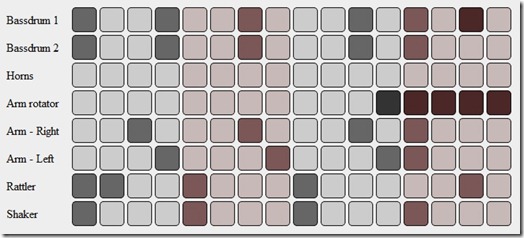
You control it like most drum computers: you draw the beats on a pattern of sixteen dots, perfectly suited for generic 4/4 rhythms.
There a 8 lines, each controlling 1 servo motor.

Most of the servo’s have a percussion item both on the left and the right, that’s why the pattern buttons have 3 states: off, left, right.
That makes 14 distinct percussion sounds for the drummerbot.

The pattern in the webbrowser is packed into a string, which get send to the Arduino via HTTP.
You can use a wifi module and a http server on the Arduino, or you can use another device attached to the Arduino through a comm port.
The Arduino receives the string, unpacks it back to a pattern and simple loops over the steps controlling each servo.

The Arduino code can be got from here. The music did make me smile!

[Via: GeekyGadgets and Steff's blog]

Arduino Blog 29 Mar 21:18
arduino  drums  music  toys  

Drummerbot Makes Beats with Arduino

Using a web-based phone controller, Steffest controls an array of fourteen percussive instruments that are packed into a setup so tightly I can’t help but use the word “cute.” Despite the amount of instruments, the bot uses only eight servos, six of which play different instruments depending on which direction they swing towards.

The bot provides a convincing Bo-Diddley beat as the maker plays guitar and sings.

The phone’s interface is set up like a standard digital sequencer, and the string is sent to Arduino through a WiFi module and HTTP server.

[via Hacked Gadgets]

More:


MAKE » Arduino 29 Mar 18:00
arduino  mobile  music  robotics  servo  wifi  

Finger print sensor with Arduino

A lot of times I have people asking me about interfacing a fingerprint sensor to an arduino for their school projects. Thanks to Adafruit that its now just a connection + an arduino away. The beautifully done libraries can be found here.

So have fun with this new addition to the open hardware family!

[Via: Adafruit]

Arduino Blog 29 Mar 15:40
arduino  

TITAN robot

This project is HUGE. Lets start form the begining, I am a university student and for my final project I wanted to do a big robot, that is untill I found out that the university picks a group of projects and you choose one, so I've decided to make it anyway. 

Tech specs:

Microsoft Kinect, computer/laptop, a couple of Arduinos and a rasberry pi working together over Xbee radio or something similar

Physical specs:

read more

Let's Make Robots 27 Mar 13:10
6 foot  arduino  hack  kinect  mega  rasberry pi  robot  tracked  

Arduino users are getting younger: Davis Fortenberry, 10

Arduino users are getting younger! Davis Fortenberry, Age 10 designed his own robot and won The Institute of Electrical and Electronics Engineers, South eastern competition, in Orlando. He competed with a lot of college level teams and had a robot that was equally competent.

Davis, who has tinkered with robots since he was 5, built his “davibot” in a week, starting with an m3pi (“a robot in itself, really”) as the base.

He added an Arduino (Italian microcomputer that tells the base unit whether to go left, right, straight ahead), then designed components for measuring contest specifics: voltage, capacitance, temperature and waveform.

He attends the Tennessee Virtual Academy an online approved school.

[Via: Commercial appeal]

Arduino Blog 27 Mar 12:49
arduino  competition  kids  robot  

Sensing Light Variations using LDR

Today, I’m going to show how easy it is to read data from an accessory to your android device. In this example, we are going to use a special kind of resistor whose resistance is dependent on the amount of light falling on its surface. It is called Light-Dependent-Resistor or LDR or also known [...]

Android + Arduino 26 Mar 16:03
adk  android  arduino  ldr  photocell  red pill  

Getting Started with Android and Arduino

Writing applications on Android is cool but writing applications on Android that can talk to the physical world is totally awesome. I recently bought a Seeduino ADK Board, which is actually a clone of an Arduino board that has support for the Android Accessory Development Kit. You can find more information about Seeduino here.

[...]
Android + Arduino 25 Mar 17:13
adk  android  arduino  led  red pill  

RADIX-4 FFT (integer math).

Tweaking the FFT code, that I’ve published earlier in my series of blogs, I hit a “stone wall”. There are nothing could be improved in the “musical note recognition” version of the code, in order to make it faster. At least, nothing w/o completely switching to assembler language, what I’m trying to avoid for now.  I’m sure, it’s the fastest C algorithm. Looking around it didn’t take long to find out that there is other option: change RADIX-2 algorithm for RADIX with higher order, 4, 8, or split-radix approach. Putting split-radix aside, (would it be my next adventure?), RADIX-4 looks promising, with theoretically 1/4 reduction in number of multiplications (what I believe is an “Achilles heel”).

Googling for awhile, I couldn’t find fixed point version in plain C or C++ language. There is TI’s “Autoscaling Radix-4 FFT for MS320C6000TM” application report, which I find useful , but the problem is it’s ”bind” with TI microprocessors hardware multiplier, and any attempt to re-write code would, probably, make it’s performance even worse than RADIX-2. Having “tweaking” experience with fix_fft source code from:  http://www.jjj.de/             I decide to follow same path, as I did before, adapting fix_fft for arduino: take their floating point source, disassemble it to the pieces, and than combine all parts back as fixed point or integer math components.    And you know what ? Thanks God, I successed!!!

I decided not all parts to re-assemble back again, this is why fft_size has to be power of 4 ( 16, 64, 256, 1024 etc.). Next, the software is “adjustable” for different level of the optimization. Trade is always the same, accuracy against speed. I’d highlight 3 level at this point:

1. No optimization, all math operation 15-bits.   The slowest version. Not tested at all.

2. Compromise version.  Switches: 12-bits Sine table, regular multiplication (long) right shifted >>12, Half-Scaling in the sum_dif_I (RSL) >>1. Recorded measurements result:  24 milliseconds with N = 256 fft_size.

3. Maximum optimization. Switches: 8-bits Sine table, macro assembler multiplication short cut, no scaling in the core. Timing 10.1 millisecond!!!

Fastest. Best of the Best Ever written FFT code for 8-bit microprocessor.   Enjoy the meal:   https://docs.google.com/open?id=0Bw4tXXvyWtFVMldRT3NFMGNTZVN0Y0d4eVRsenVZdw

Here is slightly modified copy, where I moved sine table from RAM to FLASH memory using progmem utility. For someone, who was curious to find the answer: how much progmem slower compare to access data in the RAM, there is an answer. 10.16 milliseconds become 10.28, or 120 usec slower. Divide by 84 x 6 = 504 number of readings, each progmem costs 0.24 useconds. Its about 4 cycles CPU.

https://docs.google.com/open?id=0Bw4tXXvyWtFVQjZpZkw1c3VUZXlmaF9sOEJwMmpEUQ

Screenshot from the running application, signal generator running on the computer, feeding audio wave to OPA and than analog input 0. Look for hardware setup configuration on the “color organ” blog-post.

LInk to first version based on RADIX-2 FFT:     LINK

BTW, there is one more important thing, I missed to emphasize in my short introductory paragraph, code offers FLEXIBILITY over SNR ratio. Basic FFT algorithm has an intrinsic “build-in” GAIN: G(in) = FFT_SIZE / 2 . (in) stands for intrinsic. That is perfect value for fft_size = 64 ( Gain = 64 / 2 = 32) and arduino (Atmel AtMega328)  10-bit ADC ( max value = 1023 ). FFT output would be 32 x 1023 = 32736, exactly 15 bit + sign. In other words, scaling in the algorithm core doesn’t required at all! That alone improve speed and lower rounding noise error significantly. The same time G(in)  grows too high with FFT_SIZE = 256, when G = 256 / 2 = 128 and output of the FFT would overflow size of 16-bit integer math. But again, scaling don’t have to be 100%, as long as there is a way to keep it in balance with ADC data. In this particular case, with 10-bit ADC, we can keep gain just below 32, it’s not necessary to make it exactly “1″.  For 12-bit ADC upper G limit would be 8, still not “1″. To manipulate the gain, division by 2 (>> 1) in the “sum_dif_I” could be set, to prevent overflow with fft_size > 64. Right shift “gain limiter” creates a square root adjustment, according to new formula: G(rsl) = SQRT (FFT_SIZE) / 4 . (rsl) stands for right-shift-limiter.

  1.  G = 1 for fft_size = 16,
  2.  G = 2 for fft_size = 64,
  3.  G = 4 for fft_size = 256,
  4.  G = 8 for fft_size = 1024.

Summing up, for using RADIX-4 with arduino ADC and FFT_SIZE <= 64, keep division by 2 (>> 1) in the “sum_dif_I” commented out. In any other circumstances, >10 bits external ADC, >64 fft_size, uncomment it.

To be continue…..


RADIX-4 FFT (integer math).

Updates on 30 Sept. 2014:

Everything below is correct, and may worth to read. But new  code based on Split Radix Real is published. Faster, lower memory demands, both version for UNO and DUE available as libraries.  New algorithm makes it possible to run FFT_SIZE =  512 on UNO board in less than 9.6 milliseconds.

/**************************************************************************************************************************************

Tweaking the FFT code, that I’ve published earlier in my series of blogs, I hit a “stone wall”. There are nothing could be improved in the “musical note recognition” version of the code, in order to make it faster. At least, nothing w/o completely switching to assembler language, what I’m trying to avoid for now.  I’m sure, it’s the fastest C algorithm. Looking around it didn’t take long to find out that there is other option: change RADIX-2 algorithm for RADIX with higher order, 4, 8, or split-radix approach. Putting split-radix aside, (would it be my next adventure?), RADIX-4 looks promising, with theoretically 1/4 reduction in number of multiplications (what I believe is an “Achilles heel”).

Googling for awhile, I couldn’t find fixed point version in plain C or C++ language. There is TI’s “Autoscaling Radix-4 FFT for MS320C6000TM” application report, which I find useful , but the problem is it’s “bind” with TI microprocessors hardware multiplier, and any attempt to re-write code would, probably, make it’s performance even worse than RADIX-2. Having “tweaking” experience with fix_fft source code from:  http://www.jjj.de/             I decide to follow same path, as I did before, adapting fix_fft for arduino: take their floating point source, disassemble it to the pieces, and than combine all parts back as fixed point or integer math components.    And you know what ? Thanks God, I successed!!!

I decided not all parts to re-assemble back again, this is why fft_size has to be power of 4 ( 16, 64, 256, 1024 etc.). Next, the software is “adjustable” for different level of the optimization. Trade is always the same, accuracy against speed. I’d highlight 3 level at this point:

1. No optimization, all math operation 15-bits.   The slowest version. Not tested at all.

2. Compromise version.  Switches: 12-bits Sine table, regular multiplication (long) right shifted >>12, Half-Scaling in the sum_dif_I (RSL) >>1. Recorded measurements result:  24 milliseconds with N = 256 fft_size.

3. Maximum optimization. Switches: 8-bits Sine table, macro assembler multiplication short cut, no scaling in the core. Timing 10.1 millisecond!!!

Fastest. Best of the Best Ever written FFT code for 8-bit microprocessor.   Enjoy the meal:   https://docs.google.com/open?id=0Bw4tXXvyWtFVMldRT3NFMGNTZVN0Y0d4eVRsenVZdw

Here is slightly modified copy, where I moved sine table from RAM to FLASH memory using progmem utility. For someone, who was curious to find the answer: how much progmem slower compare to access data in the RAM, there is an answer. 10.16 milliseconds become 10.28, or 120 usec slower. Divide by 84 x 6 = 504 number of readings, each progmem costs 0.24 useconds. Its about 4 cycles CPU.

https://docs.google.com/open?id=0Bw4tXXvyWtFVQjZpZkw1c3VUZXlmaF9sOEJwMmpEUQ

Screenshot from the running application, signal generator running on the computer, feeding audio wave to OPA and than analog input 0. Look for hardware setup configuration on the “color organ” blog-post.

BTW, there is one more important thing, I missed to emphasize in my short introductory paragraph, code offers FLEXIBILITY over SNR ratio. Basic FFT algorithm has an intrinsic “build-in” GAIN: G(in) = FFT_SIZE / 2 . (in) stands for intrinsic. That is perfect value for fft_size = 64 ( Gain = 64 / 2 = 32) and arduino (Atmel AtMega328)  10-bit ADC ( max value = 1023 ). FFT output would be 32 x 1023 = 32736, exactly 15 bit + sign. In other words, scaling in the algorithm core doesn’t required at all! That alone improve speed and lower rounding noise error significantly. The same time G(in)  grows too high with FFT_SIZE = 256, when G = 256 / 2 = 128 and output of the FFT would overflow size of 16-bit integer math. But again, scaling don’t have to be 100%, as long as there is a way to keep it in balance with ADC data. In this particular case, with 10-bit ADC, we can keep gain just below 32, it’s not necessary to make it exactly “1″.  For 12-bit ADC upper G limit would be 8, still not “1″. To manipulate the gain, division by 2 (>> 1) in the “sum_dif_I” could be set, to prevent overflow with fft_size > 64. Right shift “gain limiter” creates a square root adjustment, according to new formula: G(rsl) = SQRT (FFT_SIZE) / 4 . (rsl) stands for right-shift-limiter.

  1.  G = 1 for fft_size = 16,
  2.  G = 2 for fft_size = 64,
  3.  G = 4 for fft_size = 256,
  4.  G = 8 for fft_size = 1024.

Summing up, for using RADIX-4 with arduino ADC and FFT_SIZE <= 64, keep division by 2 (>> 1) in the “sum_dif_I” commented out. In any other circumstances, >10 bits external ADC, >64 fft_size, uncomment it.

To be continue…..


Live your life like there's no tomorrow with David Lee Roth in a box (video)

Seriously, guys, when was the last time you ran with the devil? It's been a while, hasn't it? Leave it to David Lee Roth to show us all the way, yet again, this time courtesy of Arduino-based soundbox created with help from the Adafruit Wave Shield. The box runs on a nine-volt battery and has a big trigger button on the top that plays what sounds like Roth's infamous "Runnin' With the Devil" isolated vocal tracks through a speaker on the bottom. The box's builder has promised more to come -- we'd like to request a Murry Wilson "I'm a genius, too" box, if one isn't already in the pipeline.

Continue reading Live your life like there's no tomorrow with David Lee Roth in a box (video)

Live your life like there's no tomorrow with David Lee Roth in a box (video) originally appeared on Engadget on Thu, 22 Mar 2012 15:44:00 EST. Please see our terms for use of feeds.

Permalink | Email this | Comments