iElektros.de Webstore
Webshop warehouse in Erfurt - Germany. Boards from SeeedStudio, DFRobot etc. Solar panels, robotics, motor, servo.


Webshop warehouse in Erfurt - Germany. Boards from SeeedStudio, DFRobot etc. Solar panels, robotics, motor, servo.
Percussa’s AudioCubes are wireless smart blocks for sound design, composition, live performance, music education and music app development.
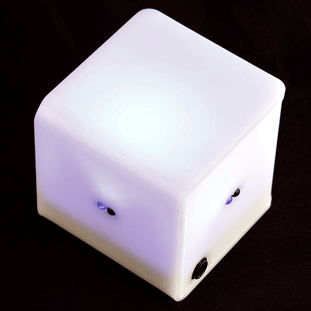
They can sense your fingers and hands as well as each other’s location and orientation. They have built in RGB lighting for visual feedback.
Shaping sounds in this fashion is much more intuitive than using knobs: rather than thinking about the particular setting a sound parameter should have, you can concentrate on the quality and timbre of the sound as you manipulate the sound, via MIDI, using your hands and fingers.
Using Arduino, you’ll be able to control an analog synthesizer that use CV signals to modulate parameters like oscillator frequency, filter cutoff, or an amplitude envelope.

Details here.
Via [Percussa, Matrixsynth]
Glitch is a sound and graphic synthesizer, powered by Arduino, fitted in a Tupperware and using few electronic components.
The sounds are generated by Puredata, then sent via OSC protocol to Processing for the graphic display.
The physical inputs are managed by an Arduino board.

It has been developed by Thomas Meghe, and here you can find the project page.

RedPark just announced a new version of their iOS cable and it’s available right now in the Maker Shed! This revised cable allows you to hook your iDevice up to an Arduino with no soldering or jailbreaking required. The new cable works just as the RS-232 terminated version except RedPark has make a few internal changes so that it communicates over TTL serial (the same serial protocol used by an Arduino.) Eliminating the need for a TTL adapter means it’s never been easier to connect your iPhone, iPad, or iPod Touch to an external microcontroller for enhanced sensing and communication!
The new RedPark TTL cable is available by itself or in a handy breakout pack that includes our deluxe jumper wires and Mintronics: Survival Pack Guts (no tin.) This way you have everything you need to hook the cable up to an Arduino and have plenty of components to experiment with. Just add an Arduino, a copy of Alasdair Allen’s “iOS Sensor Apps with Arduino,” and you’ll be up and running in no time! Also, we’ll have them in stock at Maker Faire!
Features:
More:


Michael of n0m1 Design built this Arduino-controlled night light as a Mother’s Day gift.
A few years back I made a motion sensitive night light as a Mother’s day gift and while it worked pretty well it really chewed out the batteries. And as with all devices that eat batteries it eventually fell out of use. The standby current was around 4 mA due to the common LM324 opamp that was used to amplify the PIR motion sensor signal. The original enclosure was CNC milled from a bit of re-purposed apple which had a former life as a guitar body I built as a child.
Code and schematics on the project page.


 Inspired by a Jeep’s falling water display, Matt Bell created an Arduino-based bubble display, which turns Jeep’s idea on its head. Matt’s latest version makes a few key improvements that help with the bubble size and steadies the speed at which the bubbles rise. For consistent bubble movement, Matt recommends using mineral oil and keeps each “bubble channel” (as I like to call it) in its own vinyl tube. We’re looking forward to seeing the improvements that the next version brings! [via Arduino]
More:


Coder Matt Bell is continuing to improve his exceedingly clever water-based display screen.
Inspired by a Jeep display that spelled out words with falling water, Bell’s design consists of a water tank connected to a grid of clear plastic tubes and an Arduino. Individual solenoid valves at the bottom of each tube can let in air, creating the effect of individual white pixels on a black screen, and preprogrammed sequences can spell out letters or numbers. His newest version adds an air reservoir to control the size of the bubbles, as well as completely separate vinyl tubes rather than one large tank with dividers.
More about the build-instructions and inspiration can be read here and here.
Via:[TheVerge]

A Nintendo Wii-remote along with bluetooth communication and an arduino gives us this magical cart with a wireless steering wheel.
These cool people are staunch DIY-ers and would love to see the community build more such vehicles.
The cart has two motors which use a chain to drive each of the rear wheels. A pair of H-bridge controllers let the Arduino interface with them. It’s also has a Bluetooth module that makes it a snap to pull accelerometer data from the Wii remote. The front end looks like it uses rack and pinion steering, but you won’t find a pinion or a steering column. Instead, a linear actuator is mounted parallel to the rack, moving it back and forth at the command of the Arduino.
The only downside I spot is the Battery life. I am sure that would be worked out too! Till then – Kudos to the inventors! I smell futuristic looking vehicle controls here. 
Via:[Hackaday, NewsFactor]
What do you do when you have an arduino, a camera, an ethernet shield and a doorbell? You make your own intelligent security system.
The system is actually pretty simple. When the doorbell rings an Arduino sends a request to a notification service called PushingBox which then grabs a picture from web camera located outside. Then PushingBox sends a notification to an iPhone (it looks like this can be modded slightly with PushingBox to include Android and Windows Phone as well) and an email with a picture attached.
Via:[Lifehacker]

Arduino boards have smoothed the creation of lots of eccentric thingamajigs, but robotics and controllers are still not for the faint of heart. Luckily, RoboMatter is coming to the rescue of would-be roboticists with a public beta version of its C-based RobotC language for Arduino. Joining Lego Mindstorm and other bots, Arduino will get RobotC's straightforward sensor and motor controls, along with a debugger and sample program library, while still keeping its native Wiring language. So, if you want to be a Kickstarter magnate , or just out-weird everyone else, rolling your own droid is now a bit easier.
Arduino mechs learn RobotC, plot assimilation with Lego Mindstorms originally appeared on Engadget on Sun, 13 May 2012 04:41:00 EST. Please see our terms for use of feeds.
Permalink | Email this | Comments